

A colleague of mine spent twenty minutes searching the App Store trying to find the official Ahrefs app before giving up and texting me asking if I knew where it was hiding. I went and checked properly, and the honest answer surprised me a little too.
Here's what's actually true about using Ahrefs on your phone, what doesn't exist despite what some third-party sites imply, and what genuinely works if you need to check your SEO data away from a desktop.
Is There Actually an Ahrefs App?
I want to be straight with you before anything else. Ahrefs does not currently offer a dedicated native mobile app that gives you the full SEO platform, Site Explorer, Keywords Explorer, Rank Tracker, Site Audit, all in a downloadable phone app.
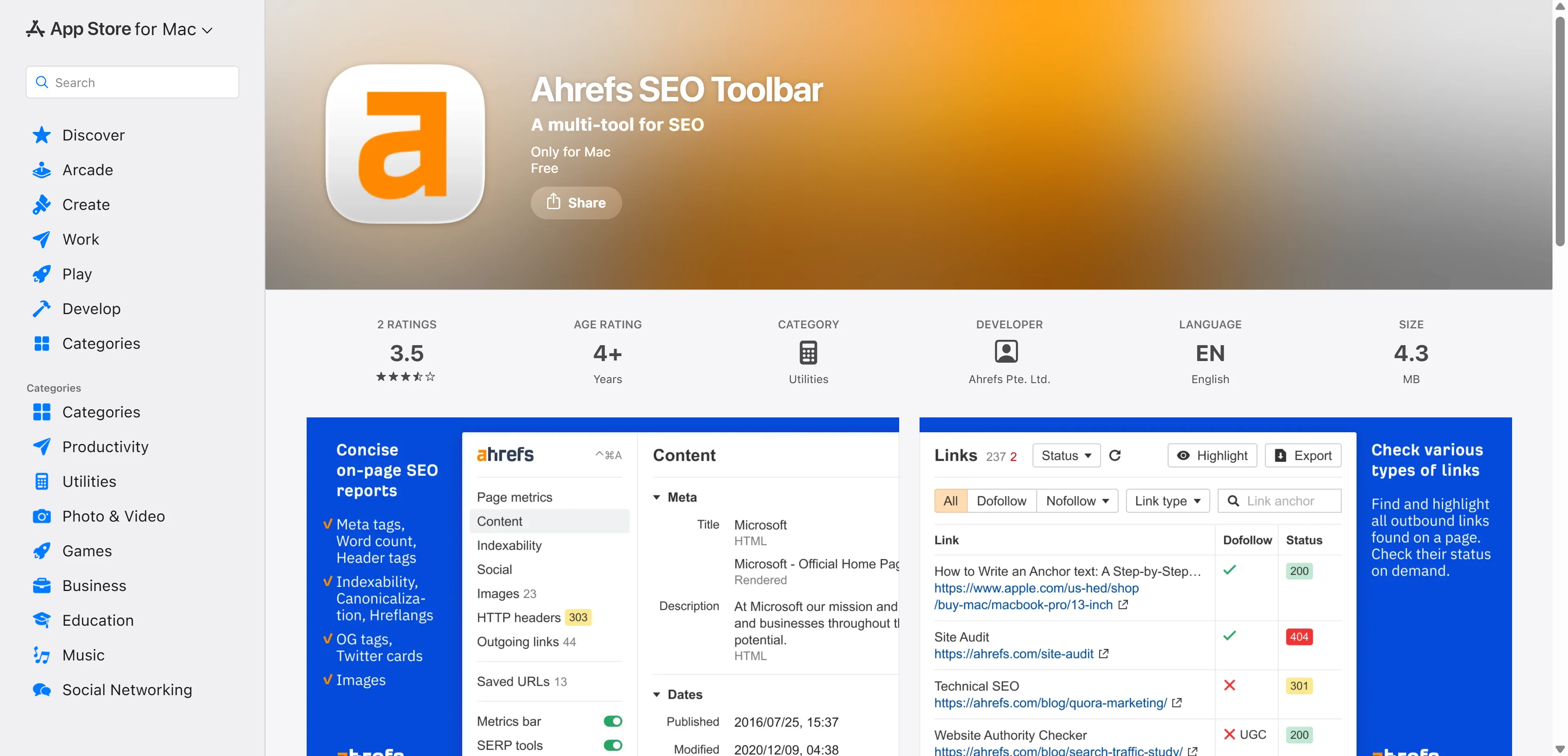
What Ahrefs Pte. Ltd., the actual company, does publish on the App Store is different from what most people are hoping to find. Their official listings include the Ahrefs SEO Toolbar, which is a browser extension ported over rather than a full platform, and a separate product called Yep, which is Ahrefs' own search engine, not an SEO dashboard app at all.
 Why the Confusion Exists in the First Place
Here's where I think the mix-up genuinely comes from. If you search around, you'll find some third-party sites showing "Download Mobile for Android" and "Download Mobile for iOS" buttons next to Ahrefs branding. Those links, in the cases I checked, actually point to a completely unrelated CRM app that happens to integrate with Ahrefs data, not an Ahrefs product itself.
You'll also find unofficial wrapper apps on sites like WebCatalog, which essentially package a website into an app-like shell for desktop use. These explicitly disclaim any official connection to Ahrefs. They're not verified, not endorsed, and not something I'd personally trust to log a paid Ahrefs account into, given the obvious security concern of handing your credentials to an unofficial third-party wrapper rather than the company's own software.
What the Ahrefs SEO Toolbar Actually Does on iOS
The one genuinely official Ahrefs mobile product worth mentioning is the SEO Toolbar. It's a free browser extension available for Chrome, Firefox, and a version for iOS specifically, functioning as an on-page SEO checker, broken link checker, redirect tracer, and country changer for search results.
Here's the honest limitation though, and Ahrefs states this themselves directly in their own App Store listing. Unlike the Chrome and Firefox versions, App Store policy prevents them from displaying full SEO metrics to Ahrefs subscribers through the iOS extension specifically. So even this official mobile product is meaningfully limited compared to what you get on desktop, not a workaround for the missing full app.
How to Actually Use Ahrefs on Your Phone
Since a dedicated app doesn't exist, your realistic option is Ahrefs' own website accessed through your phone's mobile browser. The dashboard is responsive, meaning it adapts to a smaller screen, but I'll be honest with you, checking Site Explorer or Keywords Explorer data on a phone screen is a meaningfully more cramped experience than doing the same work on a laptop.
For quick checks, glancing at rank tracking movement, checking a domain's Domain Rating, or reviewing a specific backlink report, mobile browser access genuinely works fine. For actual deep research work, comparing competitor content gaps, building out a full keyword list, running a proper site audit, you'll want a real screen and keyboard regardless of what device you're carrying.
What This Means If You're Comparing SEO Tools by Mobile Access
If mobile-first usability is genuinely a top priority for your workflow, that's a legitimate factor worth weighing against Ahrefs' actual strengths, which sit firmly in desktop-grade depth: keyword research, backlink analysis, competitor research, and technical site auditing.
As AI becomes increasingly useful across digital workflows, professionals evaluating their software stack may also benefit from understanding whether an AI image editor suitable for professional work can meet the quality and efficiency requirements of their content and marketing processes.
If you're actively deciding between Ahrefs and other major platforms and mobile access specifically factors into that decision, our full Sistrix vs Ahrefs comparison covers the broader feature and pricing trade-offs beyond just this one detail, worth reading if you're still narrowing down your actual shortlist.
The Features You're Actually Choosing Ahrefs For
Regardless of the mobile app situation, it's worth being clear about what the platform genuinely delivers, since that's the real reason people subscribe in the first place.
Site Explorer analyzes any website's backlink profile, organic traffic, and keyword rankings. Keywords Explorer uncovers search volume, keyword difficulty, and search intent for building content strategy. Site Audit scans for technical SEO issues like broken links and slow load times. Rank Tracker monitors keyword position changes over time, and Content Explorer helps surface top-performing content and topic opportunities across a niche.
None of that changes based on whether you're accessing it from a phone or a laptop, it's the same underlying data either way. The difference is purely about screen size and workflow comfort.
Pricing and Where to Verify Current Plans
Ahrefs pricing has shifted over time across its tiers, so rather than quoting a specific figure that might already be outdated by the time you read this, I'd point you directly to Ahrefs' own current pricing page before making a decision, since that's the only place guaranteed to reflect what you'd actually pay today.
What to Actually Avoid
Don't download any app claiming to be "the official Ahrefs app" from a source outside the verified Ahrefs Pte. Ltd. developer listing on the App Store or Google Play. If it's not published directly by that verified developer account, treat it as unofficial, and never enter your Ahrefs login credentials into a third-party wrapper or unverified app promising full platform access on mobile. If a full-featured mobile Ahrefs experience genuinely doesn't exist yet, no download is going to responsibly create one for you.
You can confirm exactly what Ahrefs Pte. Ltd. currently publishes directly through their official App Store developer page, which lists their verified, genuine apps rather than anything unofficial claiming the same name.
My Honest Take
If you were hoping for a dedicated Ahrefs app to do real keyword research or site auditing from your phone, that product doesn't exist right now. What exists is a limited SEO Toolbar extension and standard mobile browser access to the same dashboard you'd use on desktop, just squeezed onto a smaller screen.
For genuinely deep SEO work, you're going to want a laptop regardless. For quick checks on the go, the mobile browser handles that fine. Just steer clear of any third-party app claiming to be something Ahrefs itself hasn't actually built.
FAQs
Does Ahrefs have an official mobile app?
No dedicated app exists for the full SEO platform. Ahrefs offers a limited SEO Toolbar browser extension for iOS, but not a full Site Explorer or Keywords Explorer app.
Can I use Ahrefs on my phone at all?
Yes, through your phone's mobile browser accessing the standard Ahrefs website, though the experience is more cramped than on a desktop.
Is the Ahrefs SEO Toolbar the same as a full mobile app?
No, it's a browser extension with limited functionality on iOS specifically, and Ahrefs itself states it can't display full subscriber metrics through that iOS version.
Are third-party "Ahrefs app" downloads safe to use?
Avoid them unless they come directly from Ahrefs Pte. Ltd.'s verified developer account, since unofficial wrapper apps carry real credential security risk.
What should I do if I need Ahrefs data urgently while away from my laptop?
Use your phone's mobile browser to log into ahrefs.com directly for quick checks rather than searching for a dedicated app that doesn't exist.