
My friend Rahul manages operations for a logistics company with contractors spread across six cities. Last year he was running attendance on WhatsApp screenshots, payroll on Excel sheets, and compliance documents in a shared Google Drive folder that nobody could find anything in.
He found BeeForce, tried it for three months, and texted me saying it was the first time in two years he didn't dread the end of the month. I went and looked into it properly myself. Here's what I found.
What Is BeeForce by BlueTree
BeeForce is a cloud-based workforce management platform built specifically for companies that manage external staff. Contractors, gig workers, piece-rate employees, hourly workers across multiple sites.
BlueTree is a trailblazing IT product company specializing in creating innovative products that optimize workforce management, pioneering the management of the blue-collar external workforce and addressing all aspects of their entire lifecycle.
The key word there is lifecycle. BeeForce handles the entire worker relationship from day-zero onboarding through offboarding. Not just attendance. Not just payroll. The whole chain.
BeeForce offers complete lifecycle management solutions with onboarding, automated verification, time and attendance, payout calculation and disbursals, vendor invoicing, compliance, offboarding, and external workforce engagement.
That full-stack positioning is what separates it from tools that do one piece of the puzzle well and leave you stitching everything else together manually.
 Who Actually Gets the Most Out of This
Here's the thing. BeeForce is not a tool for a ten-person startup with full-time employees. It's built for a specific kind of operational complexity.
BeeForce by BlueTree works across various industries and company sizes, offering modular customization and integration with existing enterprise systems.
The industries that keep coming up in real user reviews are manufacturing, logistics, construction, facility management, retail, and e-commerce. Anywhere you have workers across multiple sites, mixed employment categories, and compliance requirements that don't forgive mistakes.
The companies that get the most out of it share one characteristic. They're managing workers they don't directly employ in the traditional sense. Contractors through vendors, seasonal workers, gig workers. The BeeForce model is designed around that complexity specifically.
If you have a small team of regular full-time staff and basic HR needs, this is more tool than you need and you'd be paying for capability you'd never use.
The Features That Actually Matter: A Plain English Breakdown
Let me walk through the main modules the way I'd explain them to Rahul.
 Onboarding and Verification
BeeForce supports day-zero onboarding with a completely digitized process including mobile and web-based onboarding, bulk upload capability, background verification, blacklisted employee validation and deduplication checks, and auto-generated joining documents.
That bulk upload capability is the one that matters for companies bringing on seasonal workers fast. You don't onboard 300 warehouse workers one at a time. You upload them, verify documents digitally, and get them into the system before their first shift.
From what I saw in real user feedback, this is one of the most-praised features. Companies that used to spend days on manual onboarding paperwork cut that down to hours.
Time and Attendance Capture
BeeForce provides real-time tech-driven attendance tracking using tools such as geo-fencing, facial recognition, and live shop-floor dashboards, helping eliminate billing leaks by ensuring organizations pay only for actual hours worked.
Multiple capture methods matter because not every site has the same tech readiness. A corporate office can use app-based check-in. A factory floor might use biometric terminals. A delivery hub might use QR codes. BeeForce handles all of them feeding into the same system.
Self-service options for employees and managers include time card view, shift view, holiday calendar view, leave requests, regularization requests, market visit tracking, and employee claims view.
That self-service layer reduces the volume of admin queries. Workers can see their own records, request leave, and check their attendance history without going through a manager for every small thing.
Shift Scheduling and Management
BeeForce includes auto rostering and shift management, bulk and individual level scheduling, customizable holiday calendar and leave management, pre and post-approval overtime options, continuous presence and continuous absence tracking, and attendance dashboard reports. CoinCodex
The auto rostering piece is genuinely useful when you're managing large shift-based teams. Manually building schedules for 500 workers across three shifts at multiple sites is one of those invisible time sinks that BeeForce handles automatically.
Payroll and Payout Calculation
Collected time and attendance data flow into payroll routines. The platform aims to reduce errors in wage calculations and automate payouts where possible while keeping records needed for statutory audits.
The connection between attendance data and payroll is the piece that eliminates disputes. When the payroll number comes directly from the attendance system rather than from a manually entered spreadsheet, both the company and the worker have access to the same underlying data. Disputes drop significantly.
This is also where BeeForce integrates well with AI tools for HR automation to simplify workforce operations and payroll accuracy, which is increasingly relevant as companies look for end-to-end automation rather than point solutions.
Compliance and Statutory Reporting
Compliance management helps comply with statutory regulations to uphold natural justice and mitigate legal risks, reputational risks, and litigation.
For Indian companies specifically, BeeForce has built-in handling for PF, ESI, and state-wise statutory requirements. That India-centric compliance depth is one of the reasons it gets strong reviews from manufacturing and logistics companies operating at scale in the Indian market.
Dashboard and Analytics
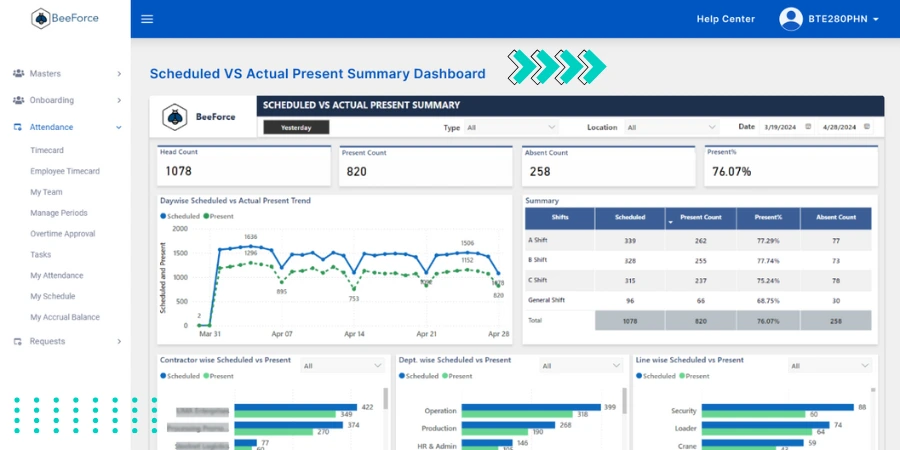
BeeForce software features a centralized dashboard that consolidates key data on employee performance, task status, and project progress, enabling managers to quickly identify operational bottlenecks and adjust resources efficiently.
The dashboard is where the whole system comes together from a management perspective. Attendance exceptions, onboarding status, payroll summaries, compliance flags. Everything in one view rather than switching between four different tools to get a complete picture.
What Real Users Are Actually Saying
I want to give you the honest picture from actual users, not just the marketing material.
On the positive side, the consistent themes in G2 and Gartner reviews are the simple and clean dashboard, ease of navigation, and responsive customer support. Multiple reviewers specifically mentioned that implementation didn't require long onboarding training for their teams.
Users highlight the simple and neat dashboard, ability to handle client side workflows and employee side workflows in one place making it easier to manage business processes better, and a UI simple enough to navigate that implementation was easy with a dedicated customer support making the experience seamless.
The critical feedback is also consistent. Bulk offboarding can be slow. The mobile app has some feature gaps compared to the desktop version. Some users report brief lags during peak operations or large data uploads.
Some reviewers note that BlueTree did not make it easy to navigate the dashboard or UI or make it self-explanatory on what was what. Finding essential financial and tax documents is not always self-explanatory or easy.
That contrast between users who found the UI simple and users who found it confusing is interesting. It likely reflects the complexity of the setup and how well-configured the implementation was for each company's specific workflows.
Three Real-World Scenarios Where BeeForce Actually Delivers
Let me make this concrete with scenarios that map to how the tool actually gets used.
 The Manufacturing Plant With Multiple Shifts
A large factory with 800 contract workers across three shifts. Previously, attendance was captured on paper sheets submitted to HR at shift end, then manually entered into payroll. Disputes over overtime and attendance were weekly occurrences.
BeeForce onboards workers at the site gate with background verification on day one. Attendance flows in automatically through biometric terminals on the shop floor. That data feeds directly into payroll calculations without any manual entry step. Monthly wage disputes dropped dramatically within the first quarter.
The Logistics Hub With Seasonal Demand
A warehousing company that hires 400 to 600 seasonal pickers between October and January every year. The hiring and offboarding cycle was eating weeks of HR time every year.
BeeForce bulk uploads all seasonal workers in one session. Attendance tracks across multiple warehouse zones. At season end, payouts are calculated automatically based on actual hours and task completions. The company cut their seasonal HR admin workload by more than half.
The Facility Management Company
A service provider managing cleaning and security staff across 35 client sites. The challenge is that client SLA reporting requires accurate attendance data per site, per shift, per day.
BeeForce centralizes records across all sites. Client-specific reports generate automatically. Statutory contributions are logged per worker per site. What previously required a dedicated ops person doing nothing but report compilation now runs automatically.
How BeeForce Compares to the Alternatives
Here's the honest competitive picture for anyone doing a proper evaluation.
Deel is excellent for global contractor payments and international compliance but doesn't have the same depth of on-site attendance tracking and blue-collar workforce tools that BeeForce has built.
Rippling is a broader HR and IT platform that works well for knowledge workers and tech companies. It doesn't have BeeForce's specific features for piece-rate workers, contractor compliance, and multi-site blue-collar management.
SAP SuccessFactors is enterprise-grade and extremely powerful but comes with enterprise-grade complexity and cost. BeeForce sits in a more accessible middle ground for mid-size companies that don't have SAP implementation budgets.
Keka and Qandle are strong options for Indian mid-market companies with traditional employment models. BeeForce specifically outperforms them for companies with large external contractor and gig worker populations.
The honest differentiator for BeeForce is the contractor and gig worker lifecycle focus. If your workforce is primarily full-time direct employees, several of those alternatives serve you better. If you're managing external workers at scale, BeeForce's purpose-built approach gives it a meaningful edge.
Pricing: The Honest Picture
Public pricing for BeeForce is not available on their website. You need to contact BlueTree directly for a quote.
From what I saw across user discussions, pricing is based on worker count, which modules you need, integration requirements, and support level. That modular pricing structure means smaller implementations pay less for a subset of features while enterprise deployments get the full stack.
The vendor does offer a free trial in most cases. Given the complexity of the platform, I'd strongly recommend running a proper trial rather than committing based on a sales demo alone. The real test is whether the platform handles your specific workforce categories and compliance requirements cleanly.
The AI and Automation Layer in 2026
Here's something worth addressing because it's becoming a real differentiator in this category.
Workforce management software in 2026 is increasingly incorporating AI for anomaly detection in attendance patterns, predictive scheduling based on historical demand data, and automated compliance flagging before issues become violations.
From what I saw in BeeForce's roadmap and feature additions over the past year, the platform is moving in this direction. Managers can view a centralized dashboard to check onboarding status, attendance exceptions, payroll summaries and other operational KPIs making it easier to spot issues early. The system surfaces exceptions proactively rather than requiring managers to go looking for problems.
For businesses thinking about how their workforce management stack connects to their broader technology tooling, this is worth evaluating specifically during the trial period. Ask the BeeForce team about the AI-driven anomaly detection and predictive scheduling features and verify they work with your specific data volumes before signing a contract.
If you want to understand the broader landscape of AI-powered software tools for business operations, our breakdown of the best AI chatbots in 2026 covers how AI is changing business software across categories, which is relevant context for any software evaluation you're doing right now.
How to Get Started
Here's the practical path to getting BeeForce up and running.
Visit BlueTree's official BeeForce page and request a demo through the contact form. Go into that demo with specific use cases prepared. Not generic questions but your actual operational scenarios: how many sites, what worker categories, what compliance requirements, what integration needs.
After the demo, request a trial environment with a subset of your actual workforce data. Testing with real data reveals integration issues and edge cases that a polished demo never will.
Once you're satisfied with the trial results, configure the full environment including mobile app setup for your teams, attendance method configuration per site, and compliance module setup for your specific statutory requirements.
Train managers first, then workers. The manager training is the more complex piece since they're the ones interpreting dashboards and exception reports.
My Honest Verdict
BeeForce is a genuinely solid platform for the specific problem it's built to solve. Large-scale contractor and gig worker management is operationally complex in ways that generic HR tools don't handle well. BeeForce has been built from the ground up for that complexity and it shows.
The mobile app gaps and occasional performance issues under heavy load are real limitations worth knowing about. The pricing opacity is frustrating for anyone who likes to evaluate cost before getting into a sales conversation.
But for a mid to large enterprise managing hundreds or thousands of external workers across multiple sites with real compliance requirements, the platform delivers on its core promise. The shift from manual processes to automated lifecycle management is the kind of change that pays for itself quickly in reduced disputes, faster onboarding, and compliance confidence.
Request the demo. Run the trial with real data. That's the only way to know if it's the right fit for your specific workforce structure.
FAQs
What is BeeForce by BlueTree used for?
BeeForce manages the full lifecycle of external, contract, and gig workers including onboarding, attendance, payroll, compliance, and offboarding from a single platform.
Does BeeForce have a mobile app?
Yes. BeeForce offers mobile apps including BeeForce Smart and BeeForce eAttendance for attendance capture and shift management on Android devices.
What industries use BeeForce most?
Manufacturing, logistics, construction, facility management, retail, and e-commerce are the primary industries using BeeForce for external workforce management.
Can BeeForce integrate with existing HR or ERP systems?
Yes. BeeForce supports API-based integrations with HR, ERP, and payroll platforms though some users report limited compatibility with older legacy systems.
How much does BeeForce by BlueTree cost?
Pricing is not publicly listed and requires a direct quote from BlueTree based on worker count, modules needed, and support requirements. A free trial is available.