
My friend who runs a streetwear brand texted me two weeks ago genuinely stressed out. He was manually posting the same content to Instagram, TikTok, Facebook, and LinkedIn every single day. Different sizes, different captions, different times. He said it was eating three hours of his day and he hadn't even touched his analytics in months.
I told him I'd figure this out for him. So I spent the next few days going through every major social media management tool out there. Here's what I found, and here's what I'd actually recommend depending on who you are.
Why You Actually Need One of These
Here's the thing. Social media in 2026 is more fragmented than it's ever been. X is still around but barely recognizable. Threads picked up. Bluesky is growing. LinkedIn posts are somehow having a moment again. TikTok is still TikTok.
Managing all of that manually isn't just slow. It's genuinely unsustainable. You're switching between five apps, rewriting captions for each platform, guessing at the best time to post, and checking notifications across six different inboxes.
A good social media management tool pulls all of that into one place. Schedule everything from one dashboard, track what's working, respond to comments without jumping between apps. Some tools even let you manage collaborations with American influencers directly from the same dashboard, which saves a separate layer of back-and-forth. That's the whole value.
What Separates the Good Ones From the Bloated Ones
I get why people ask this. They all sound the same on paper. Scheduling, analytics, inbox management, AI captions. So what actually matters?
From what I saw, the difference comes down to three things. Platform support that actually covers the networks you use. Analytics that go deeper than just showing likes and follower counts. And pricing that doesn't double the moment you add a second team member.
I went through all the major tools with those three things in mind. Here's the full breakdown.
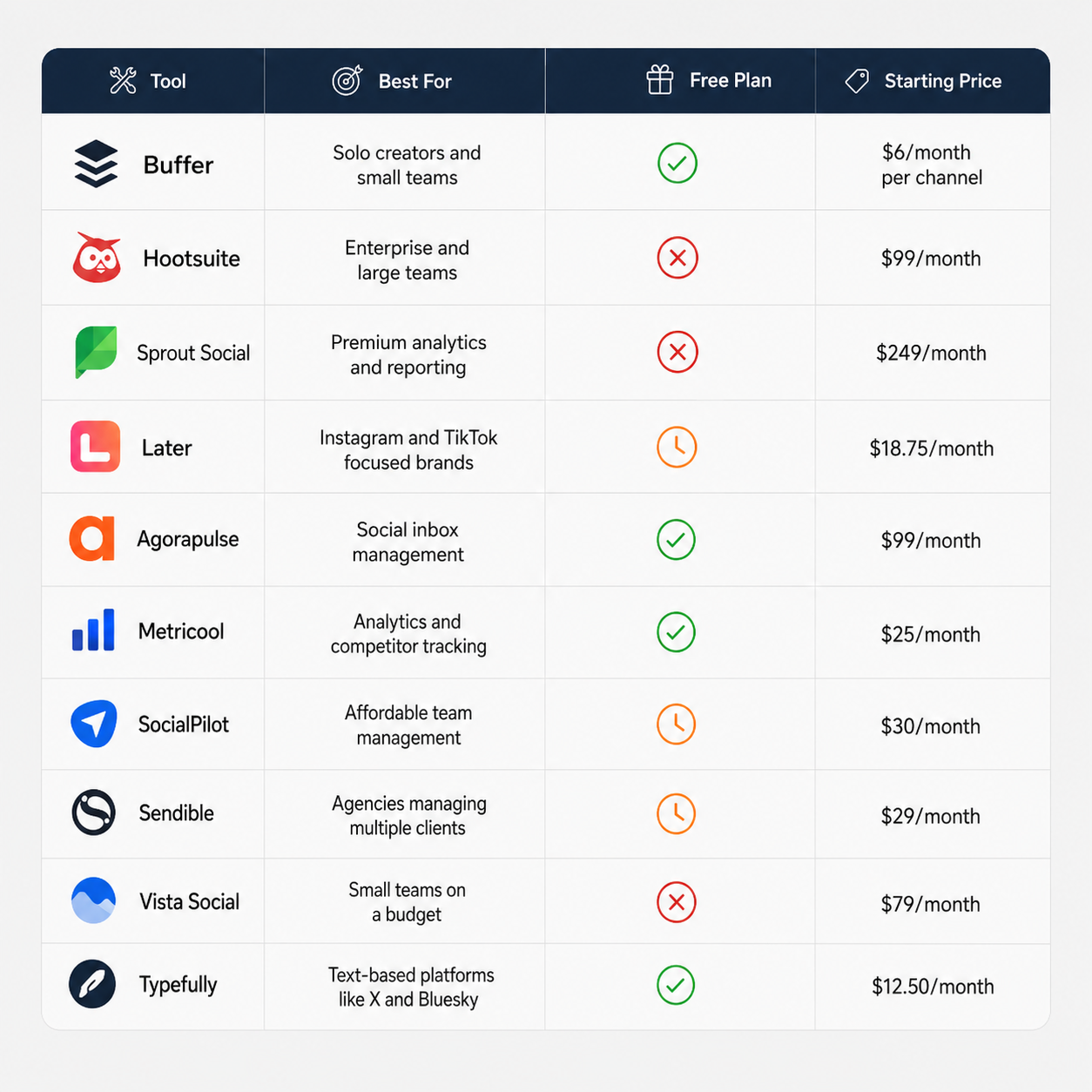
The Best Social Media Management Tools at a Glance
 1. SocialBu: Best for Growing Teams Without the Enterprise Price Tag
What I like: Flat-tier pricing means your bill doesn't jump every time you add a team member or a social account. The automation, AI scheduling, and social listening features cover ground that most tools in this price range simply don't offer.
What I don't like: Reporting isn't as polished or presentation-ready as Sprout Social. If deep analytics and boardroom-ready exports are the main need, you'll feel the gap.
SocialBu is built around a straightforward idea: give growing teams the scheduling, collaboration, and automation features that enterprise tools charge heavily for, at a price that doesn't require sign-off from a CFO.
The collaboration side is genuinely practical. You get role-based permissions, content approval workflows, and team member seats built into each plan, not sold as add-ons. The Supreme plan covers 150 social accounts and 20 team members for $199 per month flat. For context, Hootsuite and Sprout Social reach that monthly cost per user, not per team.
Beyond scheduling, SocialBu includes social listening to track brand mentions and relevant conversations across platforms, and a snippets feature that saves reusable content blocks for faster post creation.
The AI assistant generates captions, repurposes posts across platforms, and automation rules handle repetitive engagement tasks like comment replies and DM responses without manual input. It supports Facebook, Instagram, X, LinkedIn, TikTok, Pinterest, YouTube, Google Business Profile, Reddit, Threads, Bluesky, and Mastodon.
From what I saw, SocialBu makes the most sense for marketing teams of two to ten people who've outgrown Buffer but can't justify Sprout Social's per-user pricing. It's also a practical agency option if you're managing a high volume of client accounts and need to keep costs predictable.
Pricing: Free plan for 2 accounts. From $19/month for the Standard plan with 12 accounts and 4 team members. 7-day free trial on all paid plans.
2. Buffer: Best for Solo Creators and Small Teams
What I like: Per-channel pricing keeps it affordable. Clean interface that takes zero time to figure out. Genuinely solid free plan.
What I don't like: If you're managing more than six or seven channels, the per-channel cost adds up faster than you'd expect.
Buffer has been around longer than most of these tools and it's stayed relevant because it doesn't try to do too much. You connect your accounts, build a content queue, set your posting schedule, and let it run. That's the pitch and it delivers on it cleanly.
It supports Facebook, Instagram, TikTok, LinkedIn, X, YouTube, Threads, Bluesky, Mastodon, Pinterest, and Google Business Profile. The free plan covers three channels with ten scheduled posts each. That's enough to test it properly before spending anything.
The AI assistant handles caption generation, post rephrasing, and content ideas. It's not the most powerful AI I've seen in this space but it works well enough for the price.
From what I saw, Buffer is the go-to first tool for creators and small business owners who just want consistent posting without complexity. It's the one I'd point my friend toward first.
Pricing: Free for 3 channels and 10 posts per channel. From $6/month per channel for unlimited scheduling. From $12/month per channel for the Team plan.
3. Hootsuite: Best for Large Teams and Enterprise
What I like: Genuinely deep social listening through Talkwalker. Team management and approval workflows are the best in class. AI features are well integrated throughout the platform.
What I don't like: The price has more than doubled over the last few years. The dashboard still feels cluttered and overwhelming when you first open it.
Hootsuite is the oldest name in this space and it's earned its reputation for a reason. It's a full command center for social media. Scheduling, inbox monitoring, analytics, competitor benchmarking, ad campaign management alongside organic posts, and social listening across 150 million websites and 30 plus social networks.
The OwlyGPT AI assistant runs throughout the whole platform. It generates captions, repurposes top performing posts, and can even flag posts that might cause PR issues before you publish them. For a team that's serious about not making public mistakes, that's actually a useful feature.
The thing is, Hootsuite makes the most sense when you're paying someone a real salary to run social media. At that point, $99 to $199 per user per month is not the most expensive line item in your social strategy. If you're a solo creator or a tiny team, there are better options here for a fraction of the cost.
Pricing: From $99/month per user for the Standard plan with 10 social profiles. Enterprise pricing available on request.
4. Sprout Social: Best for Analytics and Premium Reporting
What I like: The Smart Inbox is genuinely the best in this space. Analytics and presentation-ready reports are unmatched. Real human support on every plan.
What I don't like: The price is difficult to justify unless you're a mid-size to large business. The learning curve is real.
Sprout Social is what you move to when you need social media to work as a serious business function and you need data to prove it to people above you.
The Smart Inbox pulls every message, comment, mention, and DM across all connected platforms into one stream. It flags duplicates so two team members don't respond to the same person. It tags sentiment automatically. For customer-facing teams managing high message volume, this feature alone saves hours every week.
The analytics side is where Sprout really separates itself. You can pull presentation-ready reports that show leadership exactly how social is performing against business goals. That capability is worth something if you're in an organization that requires regular reporting.
From what I saw, Sprout is the right call for mid-size and enterprise companies, regulated industries that need compliance workflows, and anyone running a team where social media is a significant revenue driver.
Pricing: From $249/month per user for the Standard plan with 5 social profiles.
5. Later: Best for Instagram and TikTok Focused Brands
What I like: Visual content calendar lets you see exactly how your grid looks before posting. The best Reels and TikTok scheduling features I've seen in any tool. Built-in link-in-bio tool included.
What I don't like: Analytics and publishing features for platforms beyond Instagram and TikTok feel noticeably weaker. No permanent free plan, just a 14-day trial.
Later was built specifically for visual platforms and it shows. The drag-and-drop content calendar lets you preview your Instagram grid before anything goes live. You can schedule Reels, Stories, carousels, and single posts across multiple Instagram accounts at once.
The AI suite includes Smart Scheduling which analyzes your audience engagement history to recommend the exact times you should post on each platform. It also has a Future Trends feature that surfaces what's gaining traction in your niche before it peaks. That's actually useful, not just a buzzword feature.
Later supports Instagram, TikTok, Facebook, X, LinkedIn, Pinterest, Threads, and YouTube. But from what I saw, if your primary channels are Instagram and TikTok, it's the strongest purpose-built tool in this entire list for that specific use case.
Pricing: From $18.75/month billed annually for the Starter plan with 1 user and 8 social profiles.
6. Agorapulse: Best for Social Inbox Management
What I like: The unified inbox is genuinely excellent. The Inbox Assistant handles automatic sorting and delegation well. Solid platform support including Reddit and Snapchat.
What I don't like: Team plans can get expensive as you scale users. The web app interface feels slightly behind competitors visually.
Agorapulse does the same things most tools in the $99 range do but it puts more focus and polish on the inbox side than anyone else at this price point.
The Inbox Assistant automatically labels, assigns, and sorts incoming messages so your team always knows who's handling what. You can manage replies to organic posts, paid post comments, DMs, and reviews all from one place. For brands that get a lot of inbound engagement and need a team workflow to manage it, this is where Agorapulse wins.
It supports Facebook, Instagram, X, LinkedIn, TikTok, Pinterest, YouTube, Threads, Bluesky, Reddit, Snapchat, and Google Business Profile. The scheduling, team collaboration, and campaign tagging all work well. It's not flashy but it's reliable.
Pricing: Free plan for 1 user and 3 social profiles. From $99/month per user for Standard with 10 social profiles.
7. Metricool: Best for Analytics and Competitor Tracking
What I like: Connects social accounts, web analytics, and ad performance in one dashboard. Free plan is genuinely useful. One of the most affordable paid tiers in this category.
What I don't like: Scheduling feels like a secondary feature compared to the analytics focus. The interface takes a little getting used to.
Metricool sits at the intersection of your entire web presence. You can connect social accounts, your website analytics, Google Ads, Meta Ads, TikTok Ads, and even Twitch together in one dashboard. That means you can actually see how your TikTok content is driving website traffic and how that traffic converts. Most tools in this list can't do that.
The competitor tracking is another standout. Even on the free plan you can track five competitor accounts and compare your performance against theirs directly. On paid plans you can track up to 100 competitors.
From what I saw, Metricool is the right pick for marketers who are serious about understanding performance data, not just scheduling posts and hoping for the best.
Understanding performance data also requires familiarity with the metrics used to evaluate online visibility and engagement. For a deeper look at one such concept, you can explore what MEO is and how it relates to measuring and improving digital presence.
Pricing: Free for 1 brand, 20 posts per month, and 5 competitors. From $25/month for the Starter plan with 5 brands.
8. SocialPilot: Best for Affordable Team Management
What I like: Granular team permission controls at a price that won't hurt. Solid scheduling and reporting for the cost. White-label options available for agencies.
What I don't like: The interface feels less polished than Buffer or Later. AI features lag behind some competitors.
SocialPilot does for teams what Buffer does for individuals. It gives you real collaboration features, including role-based permissions where you can control exactly what each team member can see and do, without charging you Hootsuite-level prices to do it.
It supports Facebook, Instagram, TikTok, LinkedIn, X, YouTube, Pinterest, Google Business Profile, and Threads. The content calendar, bulk scheduling, and RSS feed automation all work well. Agencies also get white-label reporting, which means you can send clients branded reports without any SocialPilot branding visible.
If your main need is managing a team of two to five people on social without spending hundreds of dollars per user per month, SocialPilot is the most practical answer I found.
Pricing: From $30/month for 1 user and 7 social accounts. 14-day free trial available.
9. Sendible: Best for Agencies Managing Multiple Clients
What I like: Client management workflow is clean and well thought out. RSS feed auto-posting works reliably. Google Analytics integration shows how social drives web traffic.
What I don't like: Deep analytics on X are limited. Feature set is solid but not groundbreaking at any specific thing.
Sendible is built for the agency workflow specifically. You can manage multiple client accounts, set up separate dashboards for each, and deliver branded reports without clients ever seeing the backend of your tool.
It supports Instagram, Facebook, TikTok, LinkedIn, YouTube, X, WordPress, Threads, Bluesky, and Google Business Profile. The RSS feed integration means you can automatically pull in blog content and schedule it to go out without any manual work. That's a real time saver when you're managing ten plus client accounts.
From what I saw, Sendible nails the basics for an agency price point. It won't wow you with any single feature but it's reliable, clean, and significantly cheaper than Hootsuite for the same core workflow.
Pricing: From $29/month for the Creator plan with 1 user and 6 social accounts.
10. Vista Social: Best for Small Teams on a Budget
What I like: Team collaboration features at a price that doesn't require a budget meeting. Built-in DM automation and social listening. Supports an impressive range of platforms including Reddit and Tumblr.
What I don't like: The web app feels slightly less refined than some pricier competitors. Some advanced features still feel like works in progress.
Vista Social is the answer to the question "how do I get proper team features without paying Hootsuite prices?" The Professional plan includes three users and fifteen social profiles starting at $79 per month. That's a fraction of what most team-tier plans cost elsewhere.
It supports Facebook, X, Instagram, TikTok, LinkedIn, YouTube, Pinterest, Threads, Snapchat, Reddit, Google Business Profile, Bluesky, and even Tumblr. The DM automation, social listening, and task management for tracking team responsibilities are all included.
If you're a small business with a two or three person team that needs proper collaboration without a four-figure monthly software bill, Vista Social is the most practical option in this entire list for that situation.
Pricing: From $79/month for the Professional plan with 3 users and 15 social accounts.
11. Typefully: Best for Text-Based Platforms
What I like: The best experience for managing X, Bluesky, Threads, Mastodon, and LinkedIn in one place. Auto-thread splitting is genuinely useful. Very affordable entry point.
What I don't like: Barely touches visual platforms. Not the right choice if Instagram or TikTok are your primary channels.
Typefully exists because the text-based social media landscape in 2026 is genuinely fragmented. X is still relevant but different. Bluesky is growing fast. Threads has a real audience. LinkedIn posts are performing better than they have in years.
Managing all of those separately is exhausting. Typefully lets you write once and send to all of them at once, or customize for each individually. It automatically splits longer posts into threads. The AI assistant helps refine drafts and suggests angles. You can collaborate with a team or get feedback from clients before anything goes live.
For creators and brands who live on the text side of social media rather than the visual side, this is the most focused and most useful tool I found in the entire category.
Pricing: Free plan with 5 drafts and 15 posts per month on X and Bluesky. From $12.50/month billed annually for unlimited posts across all supported networks.
So Which One Is Actually Right for You?
Here's my honest breakdown based on situation.
You're a solo creator or small business just getting started: Buffer. Start on the free plan, upgrade to the per-channel plan when you need more.
You need the best Instagram and TikTok scheduling available: Later. The visual grid planner alone is worth it for visual-first brands.
Your team needs collaboration features without spending a fortune: Vista Social for up to three people. SocialPilot if you need more granular permission controls.
You need serious analytics and reporting to justify social ROI internally: Sprout Social if budget allows. Metricool if you want something more affordable with solid data.
You run an agency managing multiple clients: Sendible at the budget end. Agorapulse if inbox management and client workflows matter more.
You're at an enterprise level and need social listening, compliance workflows, and deep integrations: Hootsuite. Nothing else in this list competes at that level.
You primarily post text-based content across X, Bluesky, Threads, and LinkedIn: Typefully. It's built specifically for that and it does it better than anything else here.
FAQs
What is a social media management tool?
It's software that lets you schedule posts, manage inboxes, and track analytics across multiple social platforms from one dashboard instead of switching between separate apps.
Which social media management tool is best for small businesses in 2026?
Buffer is the best starting point for most small businesses. Affordable per-channel pricing, a usable free plan, and a clean interface make it the easiest entry point.
Is there a free social media management tool?
Yes. Buffer, Metricool, Agorapulse, and Typefully all have free plans with real usable features, not just time-limited trials.
What is the best tool for Instagram scheduling?
Later is purpose-built for Instagram with a visual grid planner, Reels scheduling, Stories support, and a built-in link-in-bio tool.
Is Hootsuite worth the price in 2026?
For large teams and enterprises, yes. For solo creators and small teams, the price is hard to justify when Buffer or Metricool cover the core needs at a fraction of the cost.