
A sergeant I know from a department in Florida called me last month completely stuck. His agency had just rolled out LEFTA and he couldn't figure out which URL was the actual login page. He'd been clicking around the main website for ten minutes and kept landing on product overview pages instead of the portal.
I looked it up for him, walked him through the whole thing, and figured I'd write it all down properly.
Here's everything you need to know about logging into LEFTA in 2026.
What Is LEFTA and Who Actually Uses It
LEFTA stands for Law Enforcement Field Training Application. It's a web-based software platform built specifically for law enforcement agencies to manage field training programs, officer performance documentation, and compliance reporting.
It was founded in 2006 by Bryan Selzer, a former police officer, and has grown to serve over 400 agencies with more than 80,000 law enforcement officers nationwide.
In July 2024, LEFTA Systems was acquired by Lexipol, a major public safety policy and training company. The platform still operates under the LEFTA Systems name and the login portal has not changed.
The LEFTA SHIELD Suite: What You're Actually Logging Into
Here's the thing that confuses most new users. There isn't one single LEFTA product. There's a full suite of modules under the LEFTA SHIELD banner.
Each module handles a different function: field training documentation, performance reporting, early warning tracking, use of force reporting, internal affairs, and RIPA compliance for California agencies.
When you log in, you access the modules your agency has licensed. Not every user sees the same dashboard. What you see depends on your role and what your agency has configured.
Where to Actually Log In
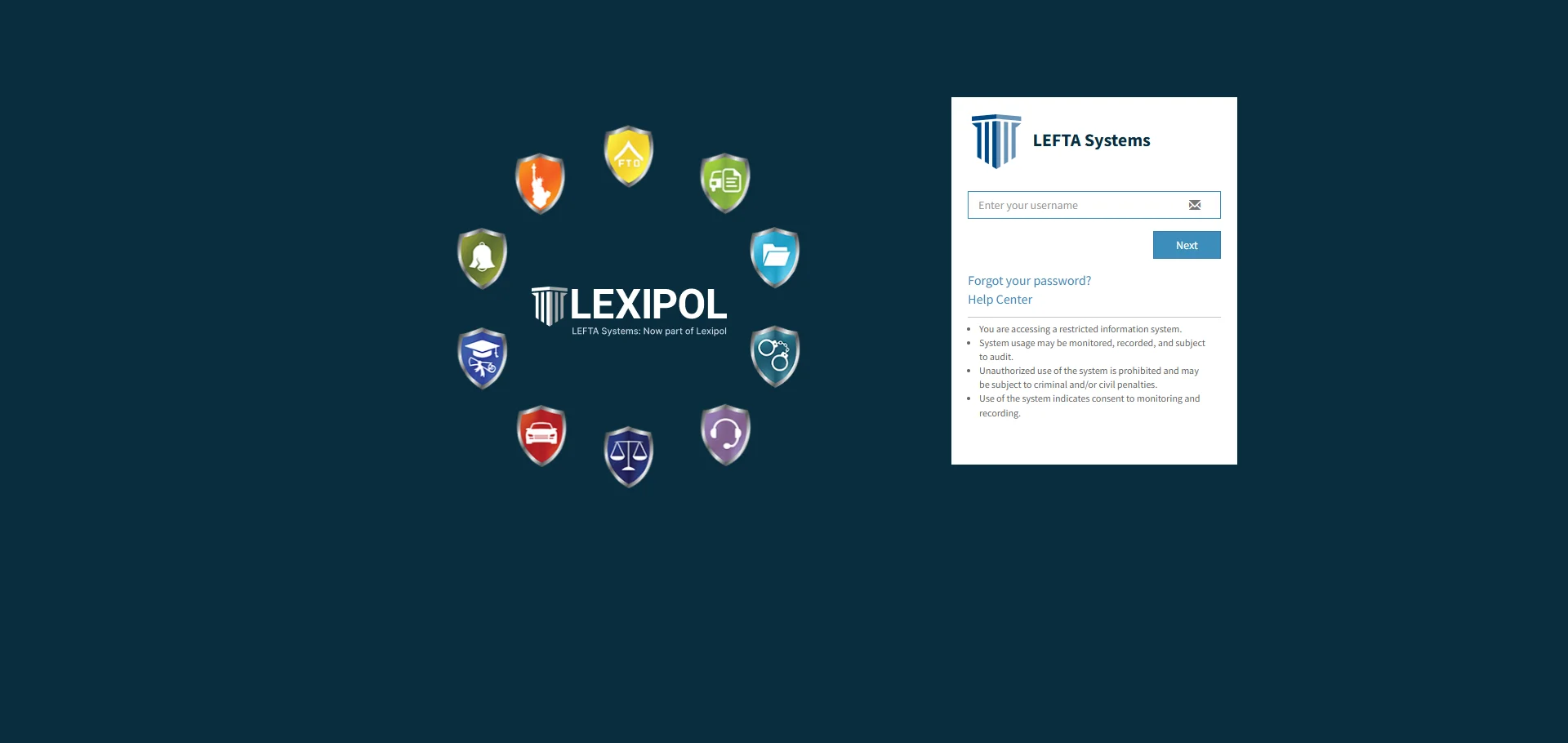
The correct login URL is shieldportal.leftasystems.net/Account/Login.
That's the SHIELD portal and it's where every LEFTA user goes regardless of which module they're accessing. The main marketing website at leftasystems.org is not the login page. It's just information about the product.
Bookmark the portal URL right now if you haven't already. It saves a lot of confusion.
 How to Log In Step by Step
Go to shieldportal.leftasystems.net/Account/Login in your browser.
Enter the username and password provided to you by your agency administrator. These credentials are set up at the agency level, not by LEFTA directly. If you've never received login credentials, your agency's system administrator is the first person to contact.
Click Sign In and the system loads your dashboard with the modules your role has access to.
First Time Logging In
If it's your first time, your administrator may have sent you a temporary password. Log in with that and you'll be prompted to set a new one immediately.
Make sure you type the password manually rather than pasting it. Copied passwords can carry invisible characters that cause failed login attempts even when the password looks correct on screen.
Session Timeout
Here's something worth knowing before your first session. LEFTA will time out after a period of inactivity and display a warning message before logging you out automatically.
From what I saw, the session timer shows a two minute warning before expiring. If you see that pop up, click OK to stay logged in and keep your work.
Forgot Your Password
If you can't remember your password, click the Forgot Password link on the login page. Enter your registered email address and the system sends a reset link to your inbox.
Check your spam folder if the email doesn't arrive within a few minutes. Law enforcement agency email servers sometimes filter automated messages.
If you don't have access to the email tied to your account or the reset email never arrives, contact your agency's LEFTA system administrator directly. They can reset your credentials from the admin side.
Account Locked Out
Multiple failed login attempts will trigger an account lockout as a security measure. This is by design for a platform handling sensitive law enforcement documentation.
Don't keep trying with the wrong credentials. That extends the lockout period.
The fastest resolution is either a password reset through the Forgot Password link if you know your email, or contacting your agency administrator to manually reset your account access.
Role-Based Access: Why Your Dashboard Looks Different
This is the part that trips up officers who are used to commercial software where everyone sees the same interface.
LEFTA is built with role-based access control. A field training officer sees documentation tools for trainee evaluations. A supervisor sees performance monitoring and reporting across their team. An administrator sees configuration options that regular users never see at all.
From what I saw, the modules visible to you are determined entirely by how your agency administrator set up your account. If you're expecting to see a specific module and it's not there, it's not a login problem. Your admin needs to assign the correct role or module access to your account.
Also Read: How to Make a Google Slide Vertical
Accessing LEFTA From Different Devices
LEFTA SHIELD is fully web-based which means it runs in any modern browser without requiring any software installation. Chrome, Firefox, Edge, and Safari all work.
On mobile or tablet, you access the same portal URL in your mobile browser. The interface is designed to be functional on smaller screens which matters for officers documenting in the field.
From what I saw, Chrome tends to give the most consistent experience across devices. If you're running into display issues on another browser, switching to Chrome usually resolves them before escalating to a support call.
Common Login Problems and How to Fix Them
Wrong URL
The most common issue by far. People land on leftasystems.org or leftasystems.net and can't find a login button because those pages are the marketing site, not the portal. The correct address is shieldportal.leftasystems.net/Account/Login and that's the only place to log in.
Browser Cache Issues
If the login page loads incorrectly or buttons aren't responding, clear your browser cache and cookies first. Close the browser completely after clearing, reopen it, and try the portal URL again.
Cookies Blocked
LEFTA's portal requires cookies to maintain your session. If your browser or agency network has cookies blocked or restricted, the login will fail or log you out immediately after signing in.
Check your browser settings and make sure third-party cookies are allowed for the leftasystems.net domain.
Network Restrictions
Some agency networks run strict firewall rules that block certain domains. If you can access the portal from your personal device but not your agency computer, it's a network restriction issue. Your IT department needs to whitelist shieldportal.leftasystems.net on the agency network.
Contacting LEFTA Support
If you've worked through every troubleshooting step and still can't get in, LEFTA Systems expanded their technical support hours specifically for officers working extended shifts.
Live support is available Monday through Friday from 8:00 AM to 8:00 PM Eastern, which is 5:00 AM to 5:00 PM Pacific. You can reach them at 800-405-3109.
One thing I want to be real with you about here. LEFTA support handles platform-level technical issues. If your credentials are wrong, your account is misconfigured, or your role needs adjusting, those fixes go through your agency administrator first. Support can escalate with your admin if needed but the agency admin is always the first stop for access issues.
What LEFTA Is Used For Once You're In
Just so we're on the same page about what the platform does beyond just logging in.
The core LEFTA module handles field training documentation. FTOs document trainee performance against standardized evaluation criteria based on the San Jose FTO program. Everything is paperless and stored securely in the cloud.
The METR module handles ongoing training records, certifications, and attendance rosters. The EMCOT module tracks employee conduct. The PASS module handles RIPA compliance data for California agencies.
The Early Warning System is the feature that agency administrators tend to value most. It monitors data points across modules and flags potential liability issues before they escalate into serious problems. For agency leadership, that proactive visibility is the real reason they invest in the platform.
FAQs
What is the LEFTA login URL?
The correct login portal is at shieldportal.leftasystems.net/Account/Login. The main leftasystems.org website is for product information only and has no login access.
Who provides my LEFTA login credentials?
Your agency's system administrator sets up and manages all user accounts. Contact them if you've never received credentials or need yours reset.
Why can't I see certain modules after logging in?
Module access is role-based and configured by your agency administrator. If a module you need isn't visible, your admin needs to assign the correct access level to your account.
What do I do if my LEFTA account is locked?
Use the Forgot Password link on the login page if you have access to your registered email. If not, contact your agency administrator to reset your account directly.
How do I contact LEFTA technical support?
Call 800-405-3109. Live support is available Monday through Friday from 8:00 AM to 8:00 PM Eastern and 5:00 AM to 5:00 PM Pacific.