
Not every app needs to be native. Not every product needs to prioritize one platform over another. But when I look at what separates a smooth launch from a rough one, the mobile app development platform a team picks first still matters more than most roadmaps admit.
Understanding why means looking past the market share argument. Android has more global users. I am not disputing that. My case for starting with iOS is not about user counts. It comes down to consistency, development reliability, and what each platform actually hands a team to build with, including the software they will use every day to ship it.
The Real Problem Behind Any Mobile App Development Platform Choice
Building a mobile app is nothing like building a website, where the browser absorbs most of the rendering complexity. On mobile, I have to account for how the app behaves across a specific mix of hardware, operating system version, screen size, and available memory. The more fragmented that mix is across a user base, the harder it becomes for my team to ship something that holds up for everyone.
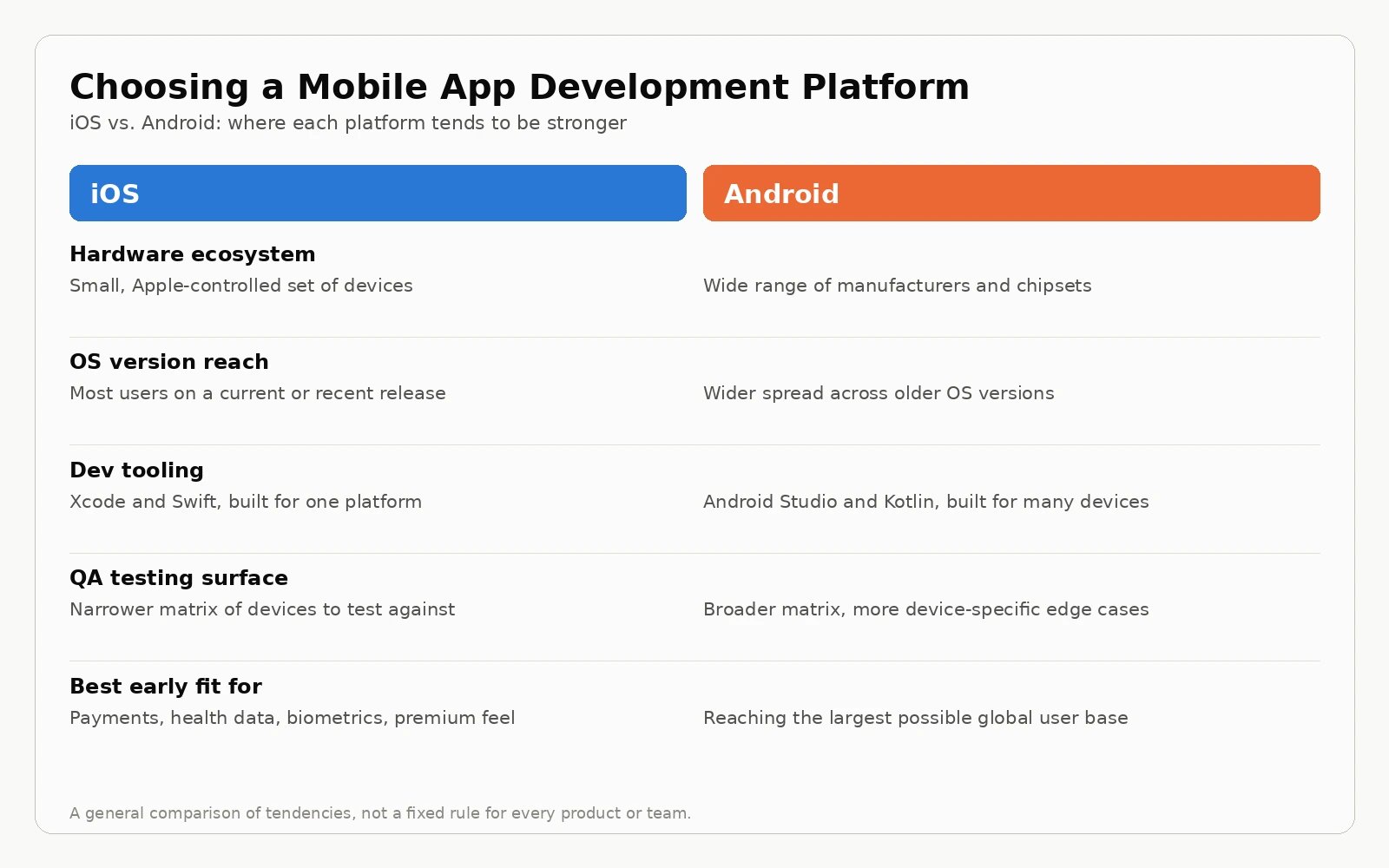
iOS runs on a fairly contained hardware ecosystem. Apple controls both the chip design and the operating system, so the number of device configurations I have to plan for stays manageable. Most active iOS users sit on a current or recent OS version, because Apple pushes updates aggressively and people tend to install them. Testing against the range of configurations that actually matter is a realistic scope of work, not an open-ended one.
Android's fragmentation is well documented, and it has improved over the years, but it is still a real variable in my planning. Device manufacturers run their own versions of the OS, update schedules vary widely, and the long tail of older devices still in daily use means edge cases show up more often and are harder to predict. None of this makes Android development impossible. It makes it more expensive to do well, and that cost shows up in QA hours before it shows up anywhere else.
The Software and Tooling Stack Behind Each Platform
This is the part of the decision I think gets skipped too often, and it is exactly where a site built around comparing software should start.
Apple's development ecosystem has been refined over decades around how professional iOS developers actually work. Xcode is a mature environment with deep integration into Apple's own hardware and simulator infrastructure. Swift is modern, strongly typed, and built specifically for the platform it runs on. TestFlight makes beta distribution to real devices simple, and Instruments gives me a level of performance profiling that is hard to match when a toolchain has to serve dozens of hardware vendors instead of one.
Android's toolchain has closed a lot of ground. Android Studio is a capable IDE, Kotlin is a well designed language, and Firebase covers everything from crash reporting to remote config in one place. The difference shows up in scope, not in effort from the people building these tools. Android Studio, Firebase Test Lab, and the Google Play Console have to work across an enormous range of manufacturers, chipsets, and OS forks. Xcode only has to work for Apple's own hardware. That focus is what shows up in edge cases.
For teams comparing continuous integration and QA software on top of either platform, tools like Bitrise, Codemagic, and Fastlane support both operating systems, but the number of device profiles a QA suite has to cover on Android is simply larger. If you are weighing testing or device management software as part of this decision, it is worth treating platform choice and tooling choice as one conversation instead of two separate ones. I keep a running list of the software comparisons on our own site for exactly this kind of side by side evaluation.
That tooling maturity matters most on projects where the implementation details are unforgiving. An app that handles payments, integrates with health data, or depends on precise hardware behavior benefits from software that was designed specifically for the platform it runs on. The gap between an API built for iOS and one designed to abstract across platforms shows up in edge cases, and edge cases are where an app either earns trust or loses it.
 Where the Native iOS Advantage Shows Up Most
The platform debate often gets framed as iOS versus Android, but I find it more useful to ask a narrower question: where does my target user actually live, and what does the product need to do on their device?
For consumer products aimed at higher income urban markets in North America and Western Europe, the user base skews heavily toward iPhone. Building for Android first in that case means running a first product test on a population that may not represent the actual customer. For enterprise products where the device is company managed, the platform is often decided by the organization's device management policy rather than by personal preference.
For products that need to feel premium, handle sensitive data, or integrate deeply with platform features like health tracking, payments, or biometric authentication, the native implementation is not just better in principle. It tends to be more reliable in practice, because the APIs were built for exactly those use cases on exactly that hardware.
Utility apps are a good example, since something like the best app blocker for iOS depends on operating system level controls that work best when the app is built natively for the platform. Teams evaluating the platform decision before a build starts can get a clearer picture of what native iOS app development involves in terms of scope, timeline, and what the platform actually enables.
Matching the Platform to Your Actual Users
I have seen teams pick a platform based on which one felt more familiar to the founders rather than which one matched the product. That usually costs more later than it saves early.
If most of your paying users carry an iPhone, starting on Android to chase total addressable market can mean spending your first development cycle building for people who are not going to convert at the rate you expect. If your product lives inside a company that issues Android devices to its field staff, the platform decision was effectively made before your team wrote a line of code.
The software side of this decision follows the same logic. A cross platform framework like React Native or Flutter can make sense when you genuinely need both platforms from day one and the app does not depend on deep hardware integration. Where the product does depend on that integration, a native build on the platform your core users already carry tends to outperform a compromise built to run everywhere at once.
Weighing the Cost of Platform Specific Tooling
Cost comparisons between iOS and Android development rarely account for the tooling and QA software each platform demands. A narrower device matrix on iOS generally means fewer QA hours per release cycle, and fewer surprise regressions tied to a manufacturer's custom Android build. On Android, that same coverage usually means budgeting for a wider spread of test devices, more time in device farms like Firebase Test Lab, and a QA process built to catch issues that only show up on specific hardware.
None of this means Android tooling is behind. It means the software budget for a thorough Android release tends to run higher for the same level of confidence, simply because the surface area is larger. When I am scoping a build, I treat that testing overhead as part of the platform decision itself, not as a line item to deal with later.
Developer Availability and Long-Term Maintenance
Platform choice does not end at launch. I think about who will maintain the app two years from now just as much as who builds version one.
Swift has stayed relatively stable as a language, and Apple's yearly OS updates tend to be well documented ahead of time, with beta releases that give teams a real runway to test against new behavior before it ships to users. That predictability makes long-term maintenance budgets easier to plan, because I am rarely caught off guard by a platform change.
Kotlin is a strong, modern language in its own right, and the developer pool for it has grown quickly. The maintenance load on Android comes less from the language and more from the hardware and OS variation underneath it. A manufacturer's custom Android build can introduce behavior that never shows up in the stock emulator, which means ongoing QA software and real device testing stay part of the cost long after launch, not just during the first release.
Neither platform is harder to hire for at this point. The difference is in what the team signs up to maintain once the app is live, and that is worth pricing in before development starts, not after the first support ticket comes in.
The Practical Takeaway for Teams Comparing Platforms
Starting with iOS is not a claim that Android users do not matter. It is a decision to run the first version of a product test on the platform where quality is easiest to control, the tooling is most mature, and user behavior is most predictable. For most teams building something that has to work well before it can be extended, that sequencing holds up.
Android comes next. The foundation built on iOS carries over, and the lessons from the first release make the Android build more targeted instead of speculative. The mistake I see most often is treating platform choice as a marketing decision instead of an engineering one, and skipping the software and tooling comparison that should come with it.
Frequently Asked Questions
Is iOS always better than Android for app development?
No. iOS tends to be the stronger starting point when quality control, tooling maturity, and a narrower device matrix matter most. Android can be the right first platform when your core users are Android-first or when the product needs the largest possible reach from day one.
What software do iOS developers use compared to Android developers?
iOS development centers on Xcode, Swift, TestFlight for beta distribution, and Instruments for performance profiling. Android development centers on Android Studio, Kotlin, Firebase for testing and crash reporting, and the Google Play Console for release management.
Does choosing iOS first cost more or less than Android first?
It depends on the product, but iOS first often costs less in QA time during the first release cycle because there are fewer device configurations to test against. Android first can cost more in tooling and device coverage, though it can pay off faster if your users are predominantly Android.
Can I build for both platforms at once with cross platform software?
Yes, frameworks like React Native and Flutter let you target both platforms from a shared codebase. They work well for apps that do not depend heavily on deep hardware integration, and less well for apps that need precise native behavior around payments, health data, or biometrics.
When does Android make more sense as the first platform?
Android makes sense first when your actual user base skews Android, when you are targeting markets where Android dominates, or when an enterprise customer's device management policy has already decided the platform for you.
How much QA time should I budget for each platform?
I generally budget more QA time for Android because of its wider device matrix, even when the codebase is smaller than the iOS equivalent. On iOS, testing against the top few current and recent devices covers most of the real-world usage. On Android, a thorough QA pass usually means testing across several manufacturers, screen sizes, and OS versions to catch the same level of edge cases.
About the author
Shir Keren works at AppMakers USA as a Project Manager and QA Analyst, keeping teams aligned and releases dependable. She supports planning, day to day coordination, and hands-on testing, with a strong focus on usability and detail. Outside the studio, she is usually hiking with her dog, cooking something new, or working on creative side projects.