
My friend Jake teaches high school band. Last year he was spending three hours every Monday on administrative work. Emailing parents about unpaid dues, tracking which student had which instrument, updating the rehearsal calendar, chasing down trip permission forms.
Someone in his school district mentioned Charms Office Assistant. He looked it up, found the website, and then found something confusing. The product seemed to have disappeared. He texted me asking what was going on.
I went and looked into it properly. Here's the full story of what Charms was, what actually happened to it, and what music program directors should use in 2026.
The Most Important Thing to Know Upfront
Let me get the critical information out first because it changes everything else in this article.
Charms Office Assistant no longer exists as a standalone product.
CutTime acquired Charms in June 2023. Core features from Charms were subsequently merged into the CutTime platform, and Charms ceased operations in September 2024.
If you were a Charms user and your data is still somewhere on CharmsOffice.com, it is not safely sitting there. The platform officially stopped operations over a year ago. Your data migration needs to happen immediately if it hasn't already.
If you're researching Charms for the first time, you're looking at a discontinued product. The good news is the platform it was absorbed into, CutTime, is worth knowing about.
What Charms Office Assistant Actually Was
For context, here's the full picture of what Charms was before the acquisition.
Charms Office Assistant was a web-based program management platform built specifically for school music programs. Band, choir, orchestra, and fine arts departments used it to handle the mountain of administrative work that music directors deal with on top of actually teaching.
Charms Office Assistant is a program management tool that combines assessment, communication, and financial systems. The entire program is accessible on a single screen and the access hub can be personalized using customizable layouts.
At its peak, Charms Office Assistant served over 30,000 music programs across the United States with features spanning instrument inventory, trip planning, and financial management.
That's not a small platform. Thirty thousand programs means hundreds of thousands of students, teachers, and parents relying on it for daily operations. The acquisition and shutdown affected a lot of people.
What the Platform Could Actually Do
Even though it's discontinued, understanding what Charms did well tells you exactly what to look for in any replacement.
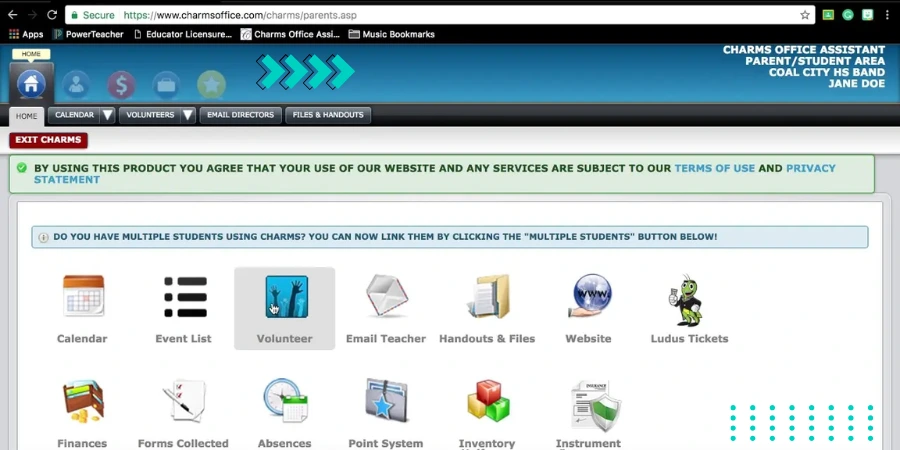 Student and Member Management
Charms had a great database for student records including parent contact information, instruments, school information, and the ability to track volunteer information including background check status.
Every student had a profile. Every parent had an associated contact record. Teachers could pull up any student's full picture in seconds instead of digging through spreadsheets.
Financial and Accounting Tools
The financial module is where Charms consistently got the strongest praise from directors who used it seriously.
It gives users access to a CPA-approved financial management system that enables users to keep an eye on bank accounts, fundraisers, budgets, and more. It allows parents to view comprehensive financial statements for their children online.
Student fee management allows online payment through PayPal. The accounting system is great for a booster club, handling student fees and fundraisers effectively.
For programs with active booster clubs, the combination of online payment collection and transparent parent-facing financial statements was a genuine operational upgrade over the Excel-and-envelope-of-cash system that preceded it.
Communication Tools
Charms offers emailing, calling, and messaging features along with news feeds for parents along with student portals equipped with a built-in recorder for two-way communication channels.
Mass messaging to filtered recipient groups saved music directors hours every week. Instead of maintaining separate email lists and sending individual messages, one broadcast reached everyone who needed to know.
Inventory and Asset Tracking
This is the feature that gets mentioned most often by directors managing large instrument collections.
You can track items by assigning unique barcodes or serial numbers. These can be scanned to take attendance, check documents in or out, and more. Charms can keep contact information, help maintain a library of documents in an organized numerical manner, and provide a calendar for important work-related events.
Knowing exactly which student has which instrument, when it was checked out, and when it's due back is the difference between a well-run program and one where instruments go missing every semester.
Practice Logs and Assessment
Students could log their practice time, submit recordings, and access their assignments through their own portal. Teachers could review logs, assess recordings, and track progress without chasing students down individually.
The student-facing experience was actually the most criticized aspect of Charms from user reviews.
From student experience, there wasn't much to love about Charms. It could be helpful for teachers but was difficult for students. The audio would stop recording randomly, it was confusing to log on to, and it was hard getting into the right class to turn in work.
That student-side friction was a real limitation. The administrative tools were solid but the experience of actually submitting recordings and completing assignments through the platform was unreliable for many users.
Who Was Using Charms and Why It Worked for Them
Here's the honest picture of who got the most value from this platform.
Directors managing large programs, 200 to 300-plus students, found Charms genuinely transformative. At that scale, the manual alternative isn't just inconvenient. It's genuinely unmanageable.
Charms has helped organize music programs of over 300 chorus students. Directors report they would be lost without it and that there are so many tools available to make day-to-day management easier.
Booster clubs and parent organizations found the financial transparency features particularly valuable. Having a system where parents could log in and see their student's account balance, payment history, and fundraiser contributions eliminated a lot of trust issues that arise when money is being managed informally.
Smaller programs had a different experience. The platform was built for complexity and with that came a steep learning curve that felt disproportionate for a 40-student program with simpler needs.
What Went Wrong: The Honest Limitations That Existed
Beyond the shutdown, here are the operational issues that users consistently flagged.
The learning curve was steep. There may be a slight learning curve for users who are not familiar with similar administrative software. For directors who weren't particularly comfortable with software, the initial setup and training period was a significant investment of time.
The interface aged poorly. Users repeatedly mentioned that the UI felt dated and less intuitive than modern software. The upgrade to a new skin that was mentioned in user reviews actually created problems as the team was slow to port features across, leaving directors flipping between old and new versions.
Integrations were limited. Charms Office Assistant offers limited integration options with other software systems, which may be a drawback for organizations with existing systems in place. No API availability according to GetApp's listing. For schools with existing SIS or ERP systems, connecting Charms to the broader technology stack was often impossible.
Pricing lacked transparency. Quotes required direct vendor contact. With starting figures referenced around $395 per module, the total cost for a fully-featured implementation was significant for programs with limited budgets.
What Happened: The Acquisition Story
Here's the timeline that explains why Charms disappeared.
JW Pepper joined forces with GroupCollect and Conn-Selmer to spin off CutTime as its own company in 2021. The acquisition of Charms Office and Texas Music Forms in 2023 cemented CutTime's status as the nation's leading program management platform for K12 and beyond fine arts education organizations in North America.
CutTime is built on modern technology architecture. Charms was built on older infrastructure. Rather than maintaining a legacy product, CutTime merged the core Charms features into their newer platform and wound down the original.
For directors who had years of data in Charms, the migration process was the critical concern. CutTime provided migration tools and support, but the September 2024 shutdown date meant anyone who hadn't migrated by then lost access.
CutTime: What Replaced Charms
Since CutTime is the direct successor and absorbed Charms' user base, here's what you need to know about it.
The first version of the new CutTime was introduced in Fall 2022. It rapidly expanded its feature set across communication, financials, and inventory areas. The new CutTime is a completely different experience from the Classic version that was previously offered.
The platform covers the same core use cases Charms served: student management, inventory tracking, financial management, communication, and event scheduling. Built on modern technology, it handles the mobile experience significantly better than Charms did.
CutTime offers SMS text communication with a 95% open and read rate for text messages within 24 hours versus only a 25% open rate for email in the same time period.
For directors who relied on Charms, CutTime is the natural migration path and the company actively supports former Charms users making the transition.
Alternatives Worth Knowing About in 2026
If you're evaluating options in the music and fine arts program management space, here's the honest comparison.
CutTime is the direct Charms successor. For anyone who used Charms and wants the closest feature-to-feature continuation, this is the starting point.
MusicFirst is a cloud-based music education platform that focuses on digital curriculum alongside administrative tools. Strong for programs that want assessment and practice tools tightly integrated.
BandHelper is a more affordable option that handles setlists, scheduling, and attachments. Less comprehensive than Charms was but significantly simpler to learn and deploy for smaller programs.
My Music Staff is popular with independent music teachers and smaller programs. Strong financial tracking, student management, and communication features at a lower price point.
Infinite Campus and Skyward are broader school ERP platforms. If your district is already running one of these, checking whether the fine arts module within them meets your needs before paying separately for a dedicated platform is worth doing.
For program directors who are also evaluating broader school operations software and want to understand how purpose-built SaaS tools compare to enterprise alternatives across other verticals, our retail management software breakdown covers a similar comparison framework in a different industry context that's worth reading for the evaluation methodology.
Use Cases That Still Apply to Any Replacement You Choose
Even though Charms is gone, the operational problems it solved are real and any replacement you evaluate needs to handle all of them.
High School Band Program With 250 Students
A director needs instrument checkout tracking, student fee collection for trips and uniform deposits, parent communication for rehearsal changes and performance reminders, and a calendar visible to students and families.
The critical question for any replacement: does it handle instrument barcoding and checkout, online payment collection, and mass messaging from a single login?
Booster Club Financial Management
A parent booster club managing fundraiser income, band camp fees, and equipment purchases needs transparent financial records accessible to committee members and parents without requiring full admin access.
The critical question: does it separate admin-level financial management from parent-facing account visibility, and does it generate the kind of financial reports a volunteer treasurer can work with?
Choir Director Managing Multiple Ensembles
A choir director running varsity choir, concert choir, and a show choir simultaneously needs to manage different repertoire, different performance schedules, different student rosters, and different trip budgets all within one system.
The critical question: does it support multiple ensemble configurations within one program account, and can communication be segmented by ensemble rather than broadcasting to everyone?
The Market Context in 2026
Here's something that adds useful perspective to any platform decision you're making right now.
The global choir management software market was valued at $1.8 billion in 2025 and is projected to reach $4.2 billion by 2034, expanding at a CAGR of 9.8%, driven by accelerating digital transformation in music education, rising community participation, and the rapid migration of administrative workflows to cloud-based platforms.
That growth trajectory means the market is actively attracting investment and new entrants. Platforms in this space are adding AI-powered features at a rapid pace.
AI applications under development include predictive analytics for member retention risk identification, automated concert program generation based on repertoire history and audience demographics, AI-powered voice part assignment for new members based on recorded vocal range assessments, and intelligent rehearsal scheduling optimization.
When evaluating any platform in this category right now, asking about their AI roadmap is a legitimate evaluation criterion. The platforms that are actively building these capabilities will look meaningfully different from their current state within 18 to 24 months.
My Honest Take After Looking at All of This
Here's what I told Jake.
Charms was a genuinely useful product for a specific problem. The directors who loved it were managing programs at a scale where the alternative was genuinely unmanageable. The platform earned its reputation for a reason.
But it's gone. The platform shut down in September 2024 and the features were absorbed into CutTime. Anyone still looking for Charms as a standalone product needs to update their search.
If you're a current CutTime user who migrated from Charms, the transition to the newer platform is worth investing in properly. The modern infrastructure and better mobile experience are real improvements over what Charms was offering in its final years.
If you're starting fresh and looking for a music program management platform, CutTime is the natural starting point given its acquisition of Charms and the breadth of features it now covers. Evaluate BandHelper and My Music Staff alongside it based on your program size and budget before committing.
The administrative problems that drove the adoption of Charms haven't gone away. Every music director I know is still spending too much time on tasks that good software should be handling automatically. The market has better options in 2026 than existed when Charms was at its peak. The job now is finding the right one for your specific program.
FAQs
Is Charms Office Assistant still active in 2026?
No. Charms ceased operations in September 2024 after being acquired by CutTime in June 2023. Former users should migrate to CutTime.
What replaced Charms Office Assistant?
CutTime acquired Charms and merged its core features into their platform. CutTime is the direct functional replacement for former Charms users.
What did Charms Office Assistant do?
Charms managed student records, instrument inventory, financial tracking, parent communication, scheduling, and practice logs for school music and fine arts programs.
How much did Charms Office Assistant cost?
Public pricing was not listed. One reference showed $395 per module as a starting point with full cost depending on program size, modules selected, and support level needed.
What are the best alternatives to Charms Office Assistant in 2026?
CutTime is the direct successor. BandHelper, My Music Staff, and MusicFirst are strong alternatives depending on program size and budget requirements.