
My cousin called me last week, kind of frustrated, going "bro I enrolled in this MedCerts course, I have my login info right here, but I cannot get into the portal."
I thought okay, this takes like two minutes to sort out. We got on a call.
Thirty minutes later, we were still troubleshooting.
That is when I realized this is actually something a lot of people are dealing with. So I sat down, did all the research, and now I am writing everything up here so you do not have to go through what we went through.
What Is MedCerts and Who Is It For
So real quick, if you are new here, MedCerts is an online training platform for healthcare and IT certifications.
We are talking programs like Medical Assistant, Phlebotomy Technician, Medical Billing, Pharmacy Tech, and a bunch more.
The courses are fully online and self-paced, which is great. But that also means you need to actually get into the portal to do anything, and that is where people get stuck.
Where to Actually Go for the MedCerts Student Login
This is the first thing I want to clear up because there is some confusion here.
There are two different sites that sound similar and people mix them up all the time.
The first one is train.medcerts.com. This is the main Learning Management System, the LMS, where enrolled MedCerts students go to do their actual coursework.
The second is medcerts.com, which is the main website. You can find student resources there too at medcerts.com/start/student-resources.
When I say MedCerts student login, I mean the learning portal at train.medcerts.com. That is where your courses, quizzes, and progress all live.
If you are going to the wrong place, that is already half the problem solved.
 How to Log In Step by Step
Okay so we are going to walk through this together.
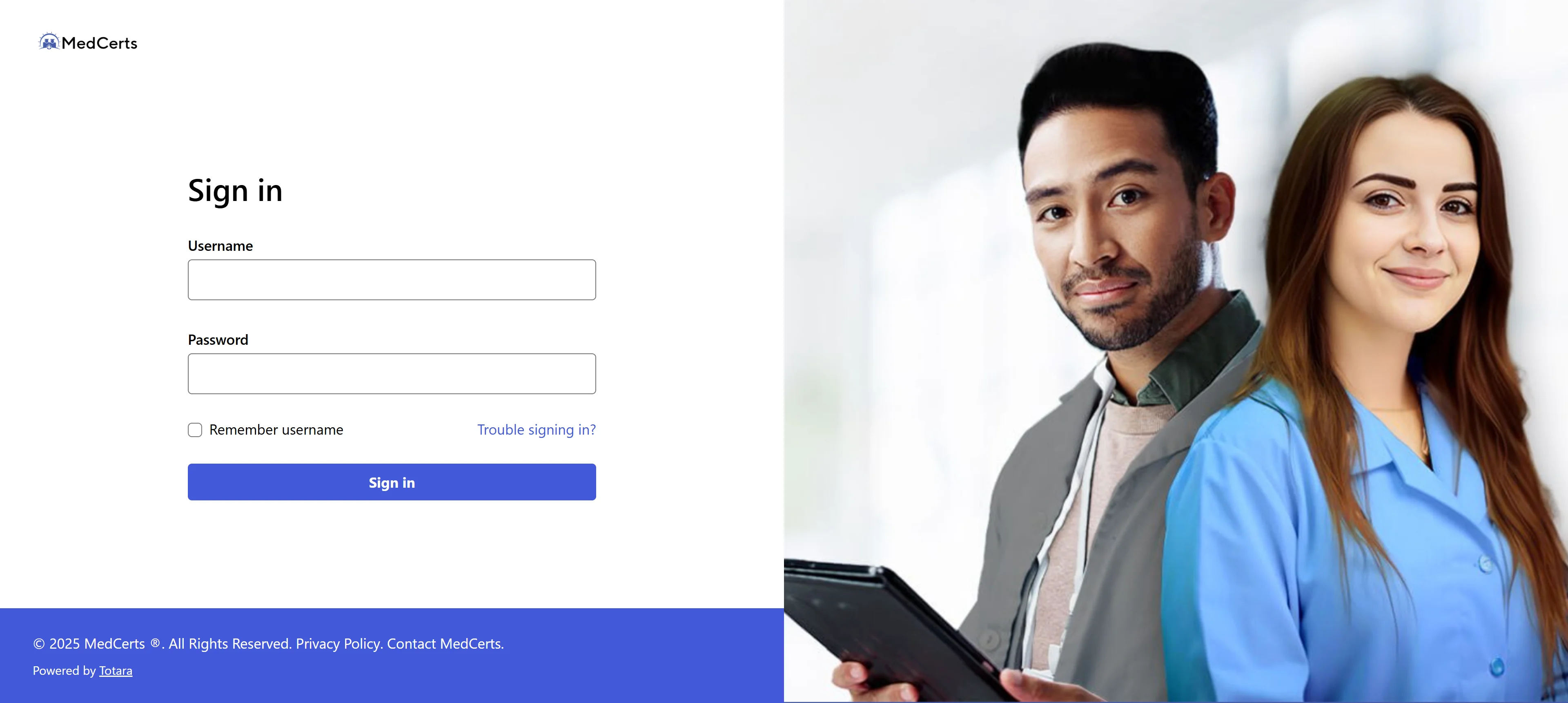
Step 1: Open your browser and go to train.medcerts.com.
Step 2: You will see a login page asking for your username and password.
Step 3: Use the credentials that were sent to you during enrollment. MedCerts sends every student a unique username and password when they get set up.
Step 4: Type in your username and password. Do not copy and paste. I know that sounds annoying but I am going to explain why this matters in a second.
Step 5: Hit login and you are in.
That is it when everything is working fine. But when it is not, that is where we need to dig a little deeper.
Why You Might Not Be Able to Log In
This is the real reason I wrote this article. Because logging in is simple, but there are a few things that trip people up constantly.
You Are Copy Pasting Your Password
I mentioned this above and I want to explain it because it sounds weird.
When you copy text from an email, sometimes invisible extra characters come along with it. Like a space at the end, or some hidden formatting character.
Your password looks right but it is technically wrong because of that extra hidden stuff.
Always type the password in manually, character by character. It makes a difference.
You Are Using the Wrong Email or Username
MedCerts gives you a specific username. It might not be your email address.
Check the original enrollment email they sent you. That email has your actual username in it. Use that, not just your email.
We made this mistake, me and my cousin. He was using his Gmail address and the system did not recognize it because his username was something slightly different.
Your Account Is Locked Out
This can happen if you enter the wrong password too many times.
If this is the case, do not keep trying. The more wrong attempts you put in, the longer things stay locked.
Just go straight to the reset option.
Also Read: MedCerts Training Login: Full Guide to Get In and Get Going
The Portal Is Down
Sometimes it is not you. It is them.
If you are entering everything right and still getting errors, wait a bit and try again. Portals have maintenance windows. Give it 15 to 20 minutes and check back.
How to Reset Your MedCerts Password
Okay so you forgot your password or something is off. Here is how we fix that.
Go to train.medcerts.com and look for the forgot password link on the login page.
Click that. Enter either your username or your email address linked to your account.
They will send you a reset email. Check your inbox. If you do not see it, check your spam folder right away because it goes there sometimes.
Click the link in the email and create a new password.
Then go back to the login page and type in that new password manually.
That is the whole process. It is pretty quick once you know where to go.
What to Do If the Reset Email Never Shows Up
This is a thing that happens and it is frustrating. You request the reset, you wait, nothing comes.
First thing, check spam. I said it already but seriously, check it again.
Second, make sure you are looking in the right inbox. Some people have multiple email addresses and they forget which one they used to enroll.
Third, if none of that works, reach out to your Student Success Advisor directly. Every MedCerts student gets assigned one. They are the people who will actually get you back in.
You can also contact MedCerts support through their help center at medcerts.com/help. There is a 24/7 self-serve option there for a lot of common questions.
What the MedCerts Learning Portal Actually Looks Like Inside
Once you are in, I want you to know what to expect so nothing catches you off guard.
There are no teachers you meet live. Everything comes through the Learning Management System itself. Videos, reading materials, quizzes, all of it is inside the portal.
You will see your courses laid out, your progress, and any upcoming quiz deadlines.
The schedule is flexible. You can work when you want. But MedCerts recommends around 15 to 20 hours a week to actually stay on track.
Quizzes require at least an 80 percent score to move on. You can retake them as many times as you need though.
Your Student Success Advisor checks in with you to keep you moving. They will email you and you can reach out to them whenever you have questions.
The First Day in the Portal: What I Wish Someone Had Told Me
When my cousin first got in, he saw a quiz already showing as due.
He panicked. He thought he was already behind.
He was not. Quizzes are preloaded into the system and it can look like they are due even on day one. That does not mean you are behind. Just start your coursework and work through it at the pace they recommend.
Also, do not skip the intro email from your Student Success Advisor on your first day. Read it. It has useful info about your program timeline and what is expected of you.
One big thing we both learned: you need to complete the first graded quiz with an 80 percent or better by day 27 of your program. If you miss that, you lose access and have to reapply. So do not sleep on it.
Can You Access MedCerts on Your Phone
Yes and this is actually pretty convenient.
The portal works on mobile through your browser. You do not have to be at a desk to get your coursework done.
A lot of students do their reading and videos on the go. Just log into train.medcerts.com from your phone browser and you are good.
Final Thoughts
Look, the MedCerts student login is not complicated once you know what you are doing.
Go to train.medcerts.com. Use the username from your enrollment email. Type your password in manually. If it fails, reset it and check spam.
I wrote this because I spent 30 minutes with my cousin sorting through something that should have taken three minutes. Now you have everything we figured out in one place.
If this helped, bookmark it so you can send it to someone else who is stuck. We have all been there.
FAQs
What is the MedCerts student login URL?
Go to train.medcerts.com. That is the main learning portal for all enrolled students.
I forgot my MedCerts username. What do I do?
Check the original enrollment email MedCerts sent you when you first signed up. Your username is in there.
Why is my MedCerts password not working even though it looks right?
Type it in manually instead of pasting it. Hidden characters from copy pasting can make the password fail.
How do I reset my MedCerts portal password?
Go to train.medcerts.com, click forgot password, enter your email or username, and follow the reset link they email you.
What if I never got my login credentials?
Contact your Student Success Advisor or reach out through the help center at medcerts.com/help right away.