
My cousin enrolled in a Medical Assistant program a few months back and the first thing she texted me was "I can't find where to actually log in." She had her enrollment email, her program details, everything. Just couldn't figure out which login page was the right one because there are a couple of different portals floating around with similar names. I walked her through it step by step and figured I'd write the whole thing down properly.
Here's everything you need to know about getting into MedCerts and using the platform once you're in.
Wait, Which MedCerts Are We Talking About?
I want to clear something up right at the start because it caused my cousin a solid fifteen minutes of confusion. There are two different platforms that share almost the same name.
The one most students are on is medcerts.com, which is the main MedCerts platform offering short-term online certification programs in healthcare and IT. This is the big one. They've helped over 80,000 students since launching in 2009 and they're backed by Stride Inc.
Then there's mymedcerts.com, which is a completely separate authorized training center for healthcare continuing education. Same-sounding name, totally different company. If you enrolled through medcerts.com, that other site has nothing to do with you. Don't get thrown off by it.
Where to Actually Log In
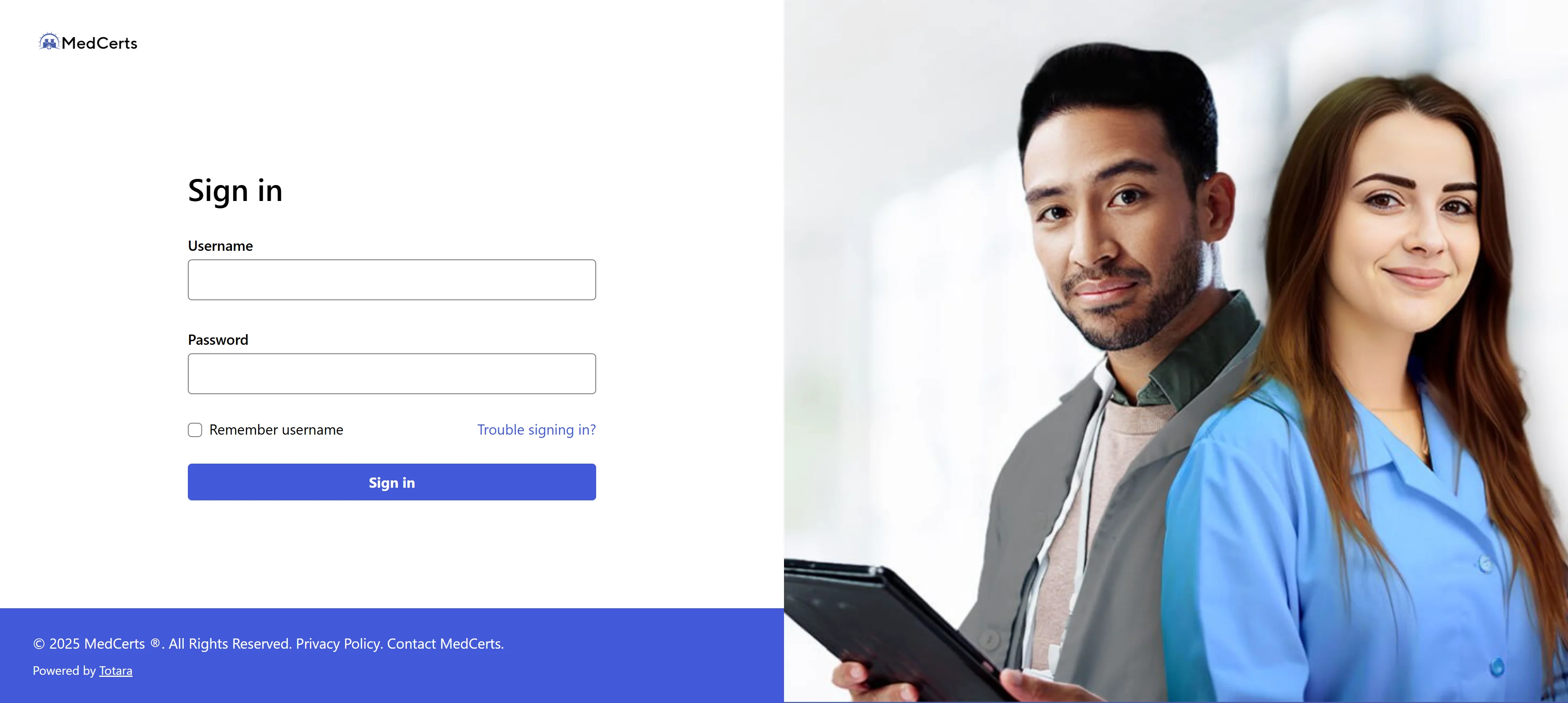
The main student login for MedCerts lives at train.medcerts.com. That's the Learning Management System, the LMS, where all your course materials actually sit.
When you enrolled, you should have received a welcome email with your login credentials. That email has everything you need including your username and a temporary or default password to get started.
From what I saw, the URL hasn't changed even after MedCerts upgraded their entire LMS system. The platform improved significantly but your login address stayed the same, which is actually helpful because you don't need to update bookmarks or hunt for a new portal.
 What the Dashboard Looks Like When You Get In
This part is worth knowing before you log in the first time because MedCerts actually walks you through it. When new students first log in, there's an orientation video led by their Senior Director of Student Success that takes you through the whole system.
You're actually required to finish the orientation before you can start any course materials. It sounds annoying but it genuinely only takes a few minutes and it saves you a lot of guessing around later.
Once you're past that, the dashboard shows you a Program Schedule with all upcoming activities and target due dates. You can see exactly what's next and click straight into it from the main screen.
The Progress Bar and How It Actually Works
Here's the thing that trips up a lot of students. The progress bar on your dashboard doesn't just count how many activities you've completed.
It calculates progress based on how many days you've been enrolled versus how many days the program is supposed to take on average, compared against the coursework you've finished. So if you've been enrolled for three weeks and you're only through the first week of material, it's going to show you behind even if you feel like you've done a decent amount.
From what I saw, MedCerts recommends around 15 to 20 hours of coursework per week to stay on track with your program end date. If tasks fall behind and become overdue, they get highlighted red and locked at the top of your schedule. You can't skip them.
The Chatbot and 24/7 Support They Added
I want to give credit where it's due here because this is actually a genuinely useful feature. MedCerts added a chatbot inside the LMS that runs 24 hours a day and can answer questions about navigating your program, finding materials, and common LMS issues.
That matters because if you're someone who studies at midnight, you're not waiting until business hours to figure out where a quiz is or why something isn't loading. The bot handles the common stuff and connects you to a real support person if the issue goes beyond what it can solve.
If you need human support for bigger issues, the contact point is [email protected]. That goes to the student technical team for LMS-specific problems.
Quizzes: The Thing Nobody Reads Before Getting Confused
Here is something I want to flag because my cousin almost panicked over this. When you first log in, the system might show a quiz as already due. Do not stress about that.
The quizzes are preloaded into the system before you even start your courses, so due dates can show up before you've had a chance to reach that material. It does not mean you're behind.
Also, you can take quizzes as many times as you need to. The threshold to move forward is a score of 80 or above. There's no penalty for retaking them, so treat it like practice until you clear that bar and move to the next section.
Forgot Your Password? Here's How to Reset It
Pretty quick process. Go to train.medcerts.com/login/forgot_password.php and enter your username or email address. The system sends a reset link to whatever email is tied to your account.
If your email is no longer active or you can't find the reset message, reach out to [email protected] directly. They handle account access issues and can get you back in manually.
One thing worth doing right now if you're already logged in is to update your password to something you'll actually remember and save it somewhere secure. A password manager works well. You don't want to be hunting for login details right before a quiz deadline.
Also Read: Dext Receipt Bank Login: Simple Access Guide
The Mobile Experience: Can You Use It on Your Phone?
MedCerts is browser-based and the LMS is accessible on mobile but I'd be real with you here. The experience is better on a laptop or desktop, especially for the longer interactive course modules and video content.
For checking your schedule, looking at upcoming due dates, and reviewing shorter materials, the mobile browser works fine. For sitting down to actually get through a full course module, use a bigger screen if you can. It'll just be a smoother experience.
There's no dedicated MedCerts student app right now, so you're working through a mobile browser either way.
Your Student Success Advisor Is an Actual Person
Here's the part that I think gets undersold when people are just trying to log in and get through their courses. MedCerts assigns every student a Student Success Advisor who monitors your progress and proactively reaches out.
From what I saw in actual student reviews, this is not a chatbot or automated email sequence. It's a real person who tracks whether you've logged in, checks if you've completed the orientation, and follows up if you fall behind. Some students talked about their advisors helping them through scheduling issues, personal circumstances, and even prepping for certification exams.
If you're not sure who your advisor is, it should be in your enrollment email. If not, emailing student support is the fastest way to get that name and contact information.
What MedCerts Programs Actually Cover
Just so we're on the same page about what you're training for inside this portal once you're logged in.
On the healthcare side, the programs cover things like Medical Assistant, Patient Care Technician, Phlebotomy, EKG Technician, Medical Billing and Coding, and Health Unit Coordinator. On the IT side, you've got CompTIA prep programs, PC Technician, IT Support, Cybersecurity Analyst, and Cloud Computing tracks.
Most programs are designed to be completed in three to six months. The certification exam fees and prep materials are included in the program cost, which is a detail worth knowing because that's not the case with every online training platform.
FAQs
What is the MedCerts training login URL?
The student login portal is at train.medcerts.com. That's where all your course materials, quizzes, and progress tracking live.
Is MedCerts the same as MyMedCerts?
No. They're completely separate companies. MedCerts at medcerts.com is the main platform for career certification programs in healthcare and IT.
How do I reset my MedCerts password?
Go to train.medcerts.com/login/forgot_password.php, enter your username or email, and a reset link gets sent to you.
Why does my MedCerts quiz show as due before I've started the course?
Quizzes are preloaded into the system at enrollment. A due date showing up early doesn't mean you're behind. Start from the beginning of your program and work through sequentially.