
My cousin's kid was glued to a screen last weekend, and for once I wasn't worried about it. She was matching countries to their outlines on a geography game, giggling every time she got one wrong and the animation played. I asked what it was called, and she said "shepard software," which is exactly what I typed into Google that night.
That's the moment I realized this is genuinely one of those searches where the actual product doesn't quite match what people type. Here's everything you need to know, including the one detail that'll save you a confused ten minutes clicking around the wrong search results.
The Spelling Detail Worth Clearing Up First
Before anything else, I want to save you some confusion. Shepard software is how most people type it into a search bar, but the real site spells it Sheppard, with two Ps, one D. It lives at sheppardsoftware.com.
That's not a small nitpick. If you type "shepard" into a search engine expecting to land directly on the site, you'll sometimes hit unrelated results, knockoff pages, or content that has nothing to do with the actual educational platform. Getting the spelling right the first time means you go straight to the source instead of digging through search results that don't actually answer what you're looking for.
What Sheppard Software Actually Is
Sheppard Software is a free educational games website built by Brad Sheppard, an educator and software developer whose goal was to make core school subjects, math, geography, science, and language arts, feel like play instead of homework.
That founder detail matters more than it might seem. This wasn't built by a marketing team chasing a trend. It was built by someone with a real education background who wanted learning content that kids would actually choose to click on rather than something forced on them during a school computer lab period.
The site has been online for over two decades at this point, and in that time it's quietly become one of the internet's most-used classroom supplements, logging over 20 million visitors and more than 5 million hours of learning in the past year alone, with adoption in more than 1,000 schools worldwide.
 How It Actually Works
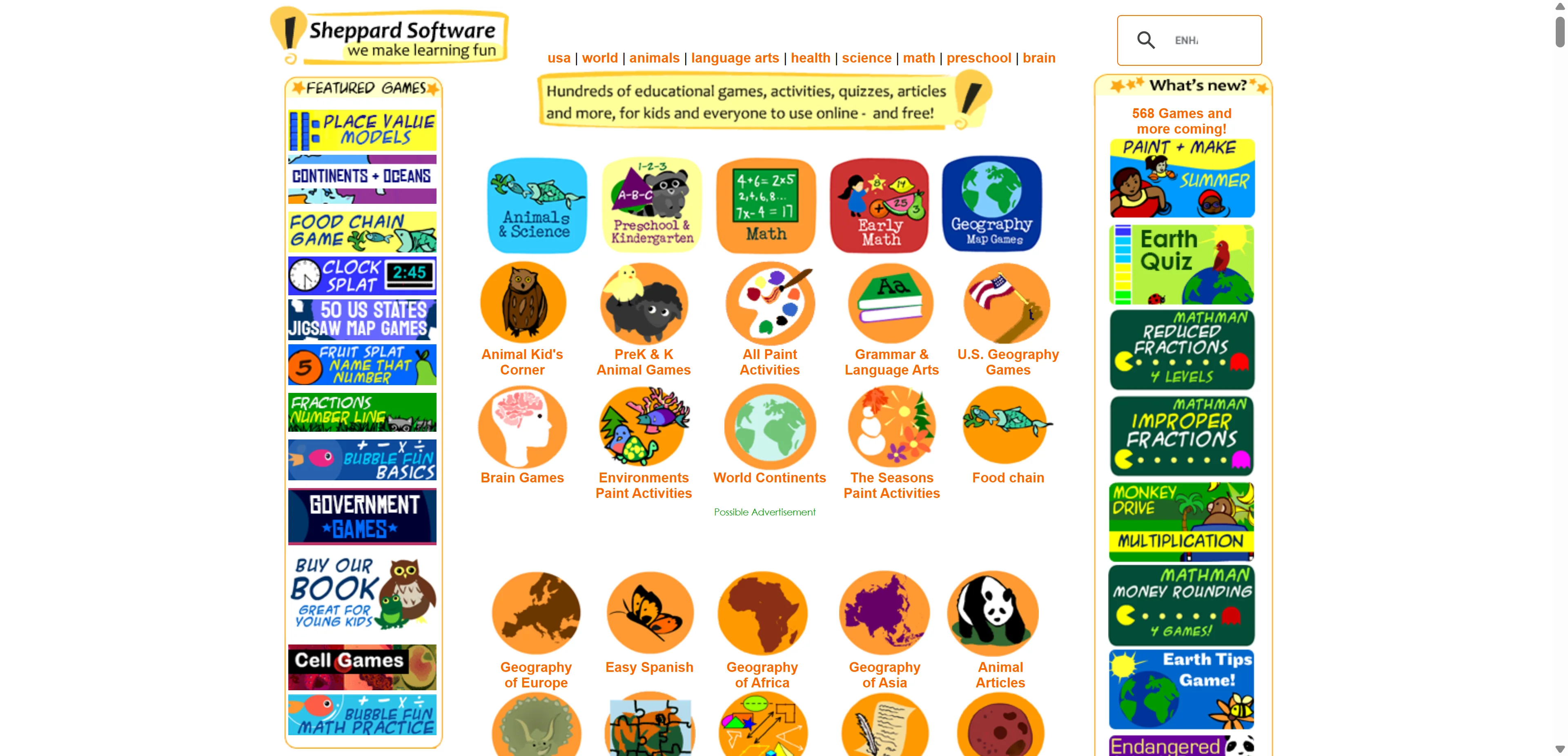
Here's the part I genuinely appreciate. There's no app to download and no account required for the free content. You go to sheppardsoftware.com, pick a subject, and start playing directly in the browser, on desktop, phone, or tablet.
That zero-friction access is a real advantage over a lot of educational apps that require account creation, parental email verification, and an app store download before a kid can play a single game. For a teacher trying to fill ten minutes at the end of a lesson, or a parent handing a phone over during a long car ride, being able to just open a browser and go matters a lot in practice.
The Flash Question You Might Have Read About
If you've come across an older review mentioning that Sheppard Software required Adobe Flash Player to work, that information is outdated. Flash was discontinued industry-wide back in 2020, and current guides describing the site in 2026 confirm it now runs entirely browser-based with no plugin or download needed at all. If you're relying on an old article that mentions Flash, treat that detail as no longer accurate.
What Subjects and Activities Are Actually Covered
The subject range is genuinely broad for a single free website. Geography covers both U.S. and world maps, math spans basic skills through more advanced practice, and science includes animals, biology, and general concepts explained through interactive games rather than static text.
Beyond that core trio, the site also covers language arts and grammar, health and nutrition basics, preschool foundational skills, and brain teaser style games aimed at general cognitive practice rather than one specific subject.
Age Range Coverage
What surprised me looking into this properly is how far the age range actually stretches. There are dedicated sections for preschool and kindergarten, elementary grades, middle school, high school review content, college-level refreshers, and even adult brain games. That's a genuinely wide net for one platform, and it means the same site can serve a five-year-old learning shapes and an adult brushing up on world geography before a trivia night.
Is Sheppard Software Actually Free
Almost entirely, yes. The majority of games and activities are free to play with no sign-up required. For families or teachers wanting an ad-free experience, there's an optional subscription running around $36 per year that removes advertisements and unlocks some additional content.
I want to be straight with you that this pricing detail comes from multiple independent reviews rather than the site's own current published pricing page directly, so treat it as a reasonable ballpark rather than a guaranteed current figure. If the exact cost matters for your decision, checking the live pricing on sheppardsoftware.com directly before committing is the safer move.
Who Sheppard Software Is Actually Built For
Teachers get genuine classroom value here. With adoption across more than 1,000 schools, the platform functions well as a supplement for reinforcing lessons, filling short transition periods, or offering a reward activity tied directly to what's already being taught, rather than random unrelated screen time.
Parents and homeschoolers get a low-friction option for structured learning without needing to manage a subscription, app download, or account setup just to let a kid practice math facts or country capitals for twenty minutes.
Students across a genuinely wide age range, from preschool through adult brain games, can find something relevant, which is unusual for a platform this size to pull off convincingly across that entire span.
Who It's Probably Not the Best Fit For
If you're looking for a fully structured curriculum with progress tracking, grading, and formal lesson sequencing tied to specific standards, this isn't that. It's a supplement, a collection of standalone games and activities, not a complete replacement for a structured learning management system with assessment built in.
How to Evaluate Any Kids' Learning Site Properly
Beyond just Sheppard Software specifically, it's worth having a general framework for evaluating any educational site before handing it to a kid unsupervised. Check what data, if any, gets collected, whether ads are age-appropriate, and whether the content is actually reviewed by educators rather than just labeled "educational" as a marketing term.
When evaluating educational platforms, it can also be useful to understand the companies and technology providers behind digital services, particularly when researching organizations such as WebSolutions LLC and their role in building and supporting web-based solutions.
For an independent, non-profit perspective on evaluating children's educational technology generally, Common Sense Media is the standard reference most parents and teachers already trust, and it's worth a quick check on any platform you're considering adding to a regular routine, not just this one.
What Reviewers Consistently Say
Across the reviews I looked at, the same handful of themes show up repeatedly. The huge free content library gets consistent praise, as does the genuine cross-age usability. Several reviewers specifically mention that the site rewards repeated play with multiple difficulty levels rather than getting boring after a session or two, which lines up with the platform's own stated design goal of keeping players challenged as they progress.
The most common mild criticism is that the interface, being built over two decades with continuous additions, can feel a little busy or cluttered to navigate at first, with a lot of brightly colored icons competing for attention on the main pages.
If You Manage a Classroom Beyond Just Learning Games
Teachers using resources like Sheppard Software in the classroom often also need broader school administration tools running behind the scenes, things like communication with parents, attendance, and enrollment. If you're evaluating that side of school technology too, our review of SchoolCues covers a school management platform built specifically for smaller schools, a genuinely different tool than Sheppard Software but one that often sits in the same technology stack for administrators and teachers managing a full classroom or school environment.
My Honest Take
Sheppard Software earns its reputation. Twenty years online, 20 million-plus annual visitors, and adoption in over a thousand schools isn't something a mediocre product accumulates by accident. The zero-signup, browser-based access is genuinely rare in a landscape where most educational platforms want an email address and an account before you see a single activity.
Just remember the spelling when you go looking for it. Sheppard, with two Ps. Type it into a search bar correctly and you'll land exactly where you're trying to go.
FAQs
Is Sheppard Software actually free?
Yes, the majority of games and activities are free with no sign-up required, with an optional paid tier around $36 per year removing ads.
Why do people search for "shepard software" instead of "Sheppard"?
It's a common misspelling of the actual site name, sheppardsoftware.com, which is spelled with two Ps and one D.
Do you need to download anything to use Sheppard Software?
No, everything runs directly in the browser on desktop, phone, or tablet with no app download or account required for the free content.
What age range does Sheppard Software cover?
From preschool and kindergarten through elementary, middle school, high school review, and even adult brain games.
Is Sheppard Software used in real schools?
Yes, the platform reports adoption across more than 1,000 schools worldwide as a classroom learning supplement.