

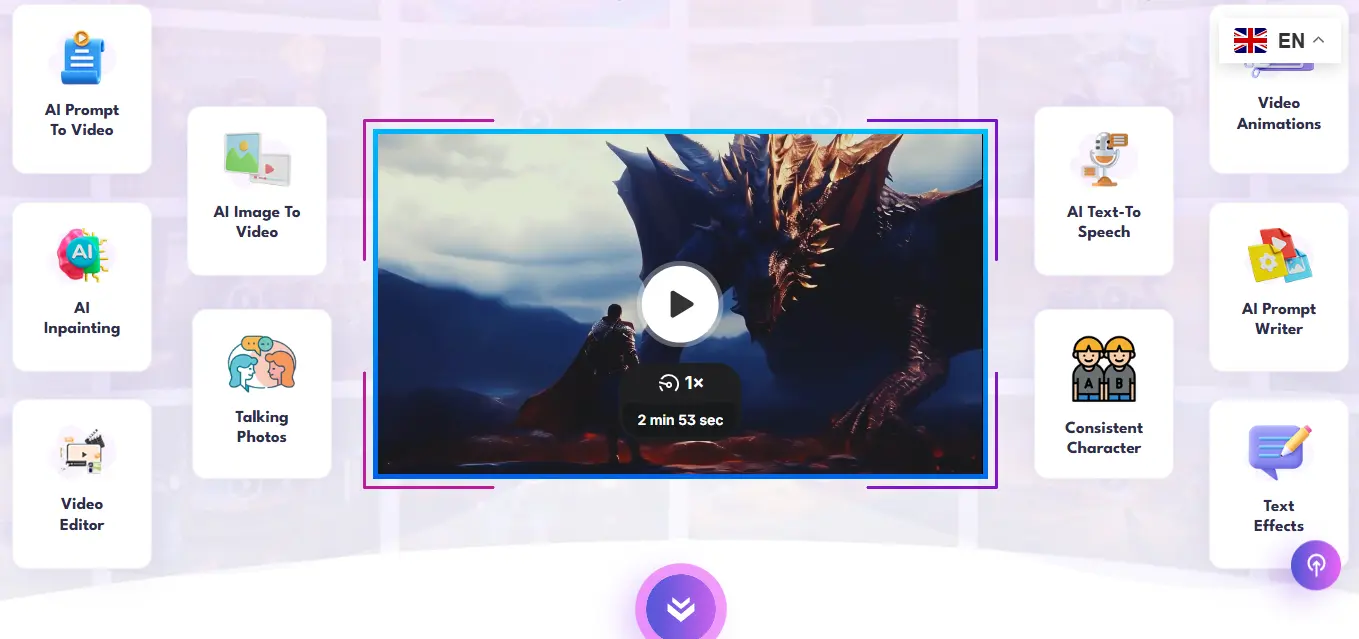
VideoExpress.ai is an all-in-one AI-powered video creation platform that transforms text prompts and images into finished videos complete with voiceovers, subtitles, animations, and sound effects. It provides a seamless way for creators to produce high-engaging ai videos all without monthly fees or prior editing experience.
If you've ever sat down to create a simple marketing video and ended up three hours deep into a free trial, five browser tabs open, and still no finished clip you'll understand exactly why a tool like VideoExpress.ai gets attention. Video content dominates every platform right now, but the production process has always been the bottleneck. Most AI tools solve half the problem and leave you managing the rest yourself. This one takes a different approach.
What Is VideoExpress.ai?
VideoExpress.ai is a cloud-based AI video creation platform that lets anyone marketers, educators, freelancers, solo creators produce fully formed videos from a text prompt or a single image. It handles the visuals, motion, voiceovers, subtitles, and sound effects inside one dashboard.
What separates it from most tools in this space is its pricing model. While nearly every competing platform charges a monthly subscription, VideoExpress operates on a one-time payment $49 for the Basic plan or $179 for full All-Access with no recurring fees after that.
For creators who've burned through $400 a month across multiple AI subscriptions just to piece together one workflow, that single fact changes the math entirely. (Tools like HeyGen, for comparison, run $29/month and up once you move past the free tier.)
 Why Creators Are Paying Attention to It
The traditional video production process involves writing a script, sourcing stock footage or images, recording a voiceover, editing a timeline, adding captions, and exporting in the right format for each platform. For a solo creator or small business, that can easily take a full day per video.
VideoExpress compresses that entire chain. You describe what you want, and the AI handles the visual generation, motion, and audio. The timeline editor lets you arrange, trim, and finalize without needing an external tool.
Users across industries faceless YouTube channels, local business marketing, e-learning, and social media video content report producing videos in under an hour that previously took a full working day. For volume-dependent creators, that kind of time compression directly affects how much content they can produce and how quickly.
Core Features That Actually Matter
1. Text-to-Video Generation
Type a description or paste a script, and the platform generates a video clip around it visuals, transitions, and timing handled automatically. Each generated clip runs up to four seconds on the Basic plan, with the option to stitch multiple clips together into videos up to one minute long.
This feature works best for short-form content: social media reels, product highlights, explainer snippets. It's not designed for long narrative storytelling, but for marketing and educational clips, the output is quick and usable without heavy post-editing.
2. Image-to-Video and Talking Photos
Upload a static image and the AI brings it to life adding cinematic motion, subtle animation, or full lip-synced speech. A product photo becomes an animated clip. A still portrait becomes a character that speaks in any of over 36 languages.
This is particularly useful for small businesses that have product photography but no video budget. A coffee shop owner can upload a photo of their signature drink, animate the steam rising, add a voiceover, and have a social media ad ready in minutes.
3. 800+ AI Voiceovers Across 36 Languages
The voiceover library covers male, female, and child voices across dozens of languages and accents. For creators doing faceless content, this removes one of the biggest barriers no recording setup, no microphone, no audio editing.
If your language isn't in the built-in library, you can upload your own audio and use the AI lip-sync technology to match it to any character on screen.
4. AI Prompt Writer
Struggling to describe exactly what you want the AI to generate? This feature converts a basic idea into a fully structured, detailed prompt the way a professional prompt engineer would write it. For beginners, this alone eliminates the biggest source of frustration: generating videos that don't match what you had in mind.
5. Sound Effects Generator
Describe an audio effect and the platform creates it or syncs it to existing video. Background ambiance, product sounds, cinematic effects all generated from text without needing a sound library subscription.
6. Timeline Editor
A basic but functional editing workspace lets you arrange clips, trim segments, add text effects, apply animations, and export in formats sized for different platforms. It handles vertical and horizontal formats, covering both YouTube and short-form social content. If you want to take that exported clip further with auto-generated captions and viral-style formatting, a tool like Submagic specializes in exactly that layer of short-form video polish.
How It Compares to Subscription-Based Tools
Feature | VideoExpress.ai | Subscription AI Tools |
|---|---|---|
Pricing Model | One-time ($49 / $179) | Monthly ($19–$76+) |
Text-to-Video | Yes | Yes |
Talking Photos | Yes | Some |
Built-in Timeline Editor | Yes | Varies |
Voiceover Library | 800+ voices, 36 languages | Varies |
Prompt Writer | Yes | Rarely included |
SFX Generator | Yes | Rarely included |
Commercial Rights | Included | Often paywalled |
Best For | Creators, marketers, educators | Enterprise teams, professionals |
Who Should Actually Use It
It makes strong sense for:
Faceless YouTube creators who need consistent video output without on-camera work
Small business owners creating social media content without a production budget
Marketers building demo ads, product reels, or promotional clips at volume
Educators producing explainer videos or course content from scripts
Freelancers offering video services to local clients without heavy software overhead
It makes less sense for:
Motion graphics professionals who need frame-level control
Filmmakers or agencies working on narrative long-form content
Teams requiring advanced editing workflows, color grading, or complex compositing
The honest framing is this: VideoExpress is built for content at speed, not cinema at scale. If your goal is consistent, professional-looking short-form video without spending hours editing it delivers. If you need full creative control over every frame, you'll hit its ceiling quickly.
Also Read: What Gorgias Actually Does to Your Support Costs as You Scale
Common Mistakes People Make
Buying Basic without understanding the clip limits. The $49 plan generates up to 3,000 video clips per month and caps video length at one minute. For light use, that's fine. For daily content production or longer videos, you'll need the All-Access plan or you'll hit the ceiling faster than expected.
Expecting cinematic AI accuracy from every generation. Some image generations produce anatomical errors extra fingers, distorted faces, misread prompt details. This is a known limitation across all AI video tools at this price point, not specific to VideoExpress. The practical fix is running multiple generations of the same prompt and selecting the best output. On a one-time payment model with no per-generation credit cost, that iteration is free.
Treating the timeline editor like a professional DAW. The built-in editor handles the basics cleanly, but users who expect features like slow-motion controls, multi-track audio mixing, or frame-by-frame precision will find it limiting. For that level of editing, export from VideoExpress and finish in a dedicated editor.
Not changing the default video privacy setting. Videos default to public unless manually changed. New users frequently miss this during their first few sessions. If you're generating test content or client work, check the privacy setting before every export.
Expert Tips
Iterate without fear. The no-credit model is genuinely liberating once you internalize it. If the first five generations miss the mark, run five more. You're not burning through a monthly allowance just time. Creators who get the best results treat prompt refinement as a process, not a one-shot attempt.
Use the Prompt Writer before anything else. Especially if you're new to AI generation. Vague prompts produce vague videos. Even a specific idea like "product ad for a skincare cream" becomes dramatically more useful once the Prompt Writer expands it into a structured, detail-rich prompt the AI can actually act on.
Batch your content sessions. Because generation occasionally slows during peak server times, the most efficient workflow is scheduling dedicated creation sessions rather than generating one clip at a time throughout the day. In a two-hour session, you can produce enough content for a week of social posts.
Pair it with basic sound treatment if using your own voice. The AI voiceover library handles most needs, but if you prefer recording your own narration, even simple acoustic adjustments a quiet room, a soft surface behind your microphone dramatically improve how the AI lip-sync matches your audio to the on-screen character.
Start with image-to-video before text-to-video. For beginners, animating an existing image produces more predictable results than generating a scene from scratch. Once you understand how the motion engine responds to different image types, text-to-video generation becomes much easier to direct.
When Should You NOT Use It?
If your work requires pixel-perfect character consistency across a long-form production, the current AI generation won't hold up across dozens of scenes. If you're building complex motion graphics or need After Effects-level compositing, this is the wrong tool entirely. And if audio quality is a non-negotiable priority podcast-level voiceover clarity, for instance the built-in text-to-speech, while solid for video, may require export and polish in a dedicated audio tool.
Is VideoExpress.ai Worth It?
For the creator it's designed for someone producing consistent short-form content without a team or a production budget the value proposition is genuinely hard to argue with. One payment, lifetime access, a full feature set, and commercial rights included from day one.
The output won't compete with high-end motion graphics or professional studio production. But for marketing reels, educational clips, social media content, and faceless video channels, it removes the two biggest barriers in video creation: cost and complexity.
That combination accessible enough for beginners, capable enough for professionals with the right use case is what keeps it one of the most talked-about AI video tools in 2025 and into 2026.
Summary
VideoExpress.ai is an all-in-one AI video platform offering text-to-video, image animation, talking photos, 800+ voiceovers, sound effects generation, and a built-in timeline editor all for a one-time price. It's purpose-built for creators, marketers, and educators who need fast, professional-looking video output without monthly fees or technical complexity. It has real limitations around advanced editing control and AI generation consistency, but for short-form content at volume, it delivers strong results efficiently.
Frequently Asked Questions
Is the one-time payment really permanent?
Yes. Both the $49 Basic and $179 All-Access plans include lifetime access with no recurring charges. The All-Access plan also removes upsell prompts entirely everything is included upfront.
Can I use the videos commercially?
Commercial rights are included with both plans. Content you generate on the platform can be used in client work, ads, monetized YouTube channels, and paid promotions without additional licensing.
What's the difference between Basic and All-Access?
Basic covers core features with a one-minute video length cap and 3,000 monthly clips. All-Access unlocks longer videos, consistent character generation, face swap, background editing, faster rendering, and automatic subtitle generation with no further upsells.
Does it work for non-English content?
Yes. The platform supports voiceover generation in over 36 languages. If your language isn't in the built-in library, you can upload your own audio and use the AI lip-sync feature to match it to any on-screen character.